
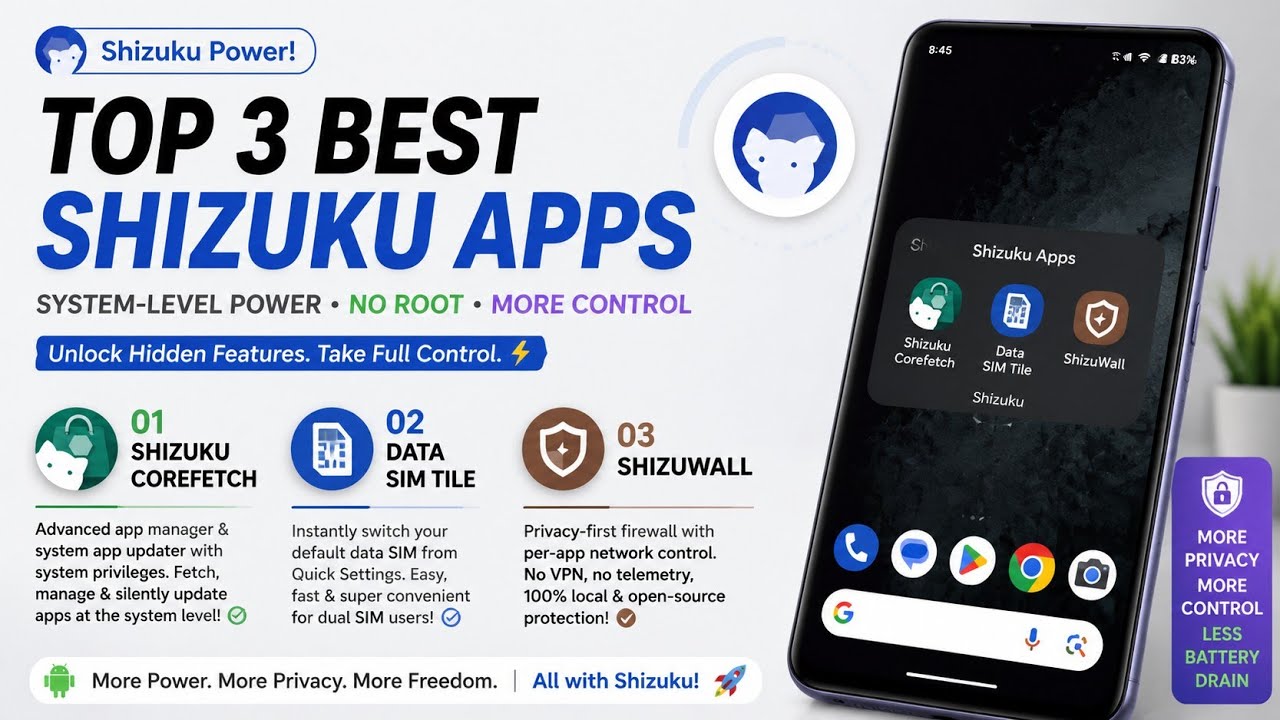
If you have been a part of the Android ecosystem for a while, you probably know that accessing deep system-level privileges used to require rooting your device. However, rooting comes with its own set of headaches—like breaking banking apps, voiding warranties, and compromising system security. This is exactly where Shizuku steps in as an absolute game-changer.
Shizuku acts as a bridge, allowing regular apps to borrow elevated system privileges using Android’s native Wireless Debugging (ADB) feature. This means you can unlock incredible capabilities on your stock, unrooted smartphone safely and efficiently. Today, I am going to walk you through my top three favorite Shizuku-powered applications that have completely transformed my daily smartphone experience.
Watch the full tutorial here on our Youtube channel:
1. Shizuku Corefetch: The Ultimate Application Hub
The first must-have tool on my list is Shizuku Corefetch. Simply put, it is an advanced, open-source application manager designed to fetch, manage, and silently update your apps with system-level privileges.
If you frequently download open-source apps from repositories like GitHub, you know the frustration of manually downloading APKs and clicking through endless Android installation prompts. Corefetch eliminates all of that.
Key Features:
- Silent Operations: By leveraging Shizuku, it installs, uninstalls, and updates apps directly in the background without a single pop-up dialog.
- Zero-Quota Architecture: It features a brilliant backend that bypasses GitHub API rate limits, meaning you can browse and download seamlessly even during high server traffic.
- Local Storage Wallet: It caches downloaded packages locally so you can easily share them or delete them to free up space.
- GitHub Integration: You can log in securely to tie your installed apps to your user profile, giving you a curated, centralized update feed.
Step-by-Step Setup:
- Download the latest Shizuku Corefetch release from their official GitHub page.
- Install the application and open it.
- Ensure your Shizuku server is running in the background via Wireless Debugging.
- Corefetch will prompt you to grant Shizuku access. Tap "Allow."
- You are now ready to browse the centralized repository and install utilities silently!
Why I use this module daily: I test a lot of open-source utilities for my workflow. Before Corefetch, keeping them all updated was a tedious manual chore. Now, thanks to the background update notifications, my device stays secure and up to date automatically. It feels like having a premium, root-level app store right out of the box.
2. Data SIM Tile: Seamless Connectivity Switching
Moving on to a highly practical utility: Data SIM Tile. If you run a dual-SIM setup for work and personal use, or for maximizing network coverage, you know how annoying it is to dig through the Android settings menu just to switch your active mobile data from SIM 1 to SIM 2.
Key Features:
- One-Tap Switching: It adds a clean tile to your Quick Settings panel. Tap it, and your data switches instantly.
- Dynamic UI: The tile label updates in real-time to display the name of the currently active data SIM.
- Native Behavior: It matches the stock Android picker behavior, automatically enabling mobile data on the newly selected SIM immediately after the switch.
Step-by-Step Setup:
- Install Data SIM Tile from its open-source repository.
- Open your Shizuku app to ensure the server is active.
- Swipe down twice on your home screen to open the Quick Settings edit menu.
- Drag and drop the new "Data SIM" tile into your active panel.
- Tap it for the first time, grant the Shizuku permission prompt, and you are good to go! Long-pressing it will route you directly to the advanced system SIM settings.
Battery impact and performance analysis: Because Data SIM Tile lacks a traditional launcher UI and runs purely as a system tile hook via Shizuku, its battery impact is completely zero. It sits dormant until you tap it. I haven't noticed a single frame drop or wakelock issue since installing it. It’s the definition of a lightweight, perfectly executed utility.
3. ShizuWall: True Privacy, No VPN Required
Finally, we have ShizuWall, which is arguably the most impressive app on this list. It is an Android firewall that operates entirely without a VPN.
Most non-root firewalls force you to route all your web traffic through a mock local VPN. This causes battery drain, packet interception, and prevents you from using an actual VPN for privacy. ShizuWall bypasses this by utilizing Android's hidden "Chain-3" connectivity framework.
Key Features:
- Zero VPN Overhead: It toggles app networking at the system level. No dummy VPNs, no battery drain.
- Privacy-First: The app is completely offline. There is no telemetry, no tracking, and no analytics.
- Granular Control: You get absolute per-app network toggling. Stop offline games from loading ads, or prevent that sketchy flashlight app from connecting to the internet.
- Multiple Controls: Manage rules via the main app, a Quick Settings toggle, a home screen widget, or a floating firewall button.
Step-by-Step Setup:
- Install ShizuWall from its GitHub repo or the Google Play Store.
- Launch the app and select "Shizuku" as your control backend.
- Grant the required permissions.
- Scroll through your app list and simply toggle the switch next to any app you want to cut off from the internet.
Potential bugs and how I fixed them on my device: Due to strict Android security policies, Chain-3 firewall rules are automatically cleared by the operating system whenever you reboot your phone. Initially, I found it annoying to re-apply my blocks. I fixed this by diving into ShizuWall's automation capabilities. By using an app like Tasker, you can set up an ADB broadcast command to automatically trigger ShizuWall's rules a few seconds after your device boots up. Once set up, it becomes a flawless, set-it-and-forget-it security layer!
Final Thoughts
Shizuku is pushing the boundaries of what is possible on Android devices, bridging the gap between standard users and advanced root capabilities in a safe, official manner. Whether it is silently managing applications with Corefetch, streamlining your workflow with Data SIM Tile, or locking down your digital privacy with ShizuWall, these tools are essential for any power user.
Have you tried any of these modules yet? Let me know which one is your favorite in the comments below!
Subscribe to our YouTube channel for daily Android tips, tricks, and tutorials: TechyNoob
Discussion (0)
Post a Comment
No comments yet. Be the first to share your thoughts!