The Evolution of the Smartphone Interface
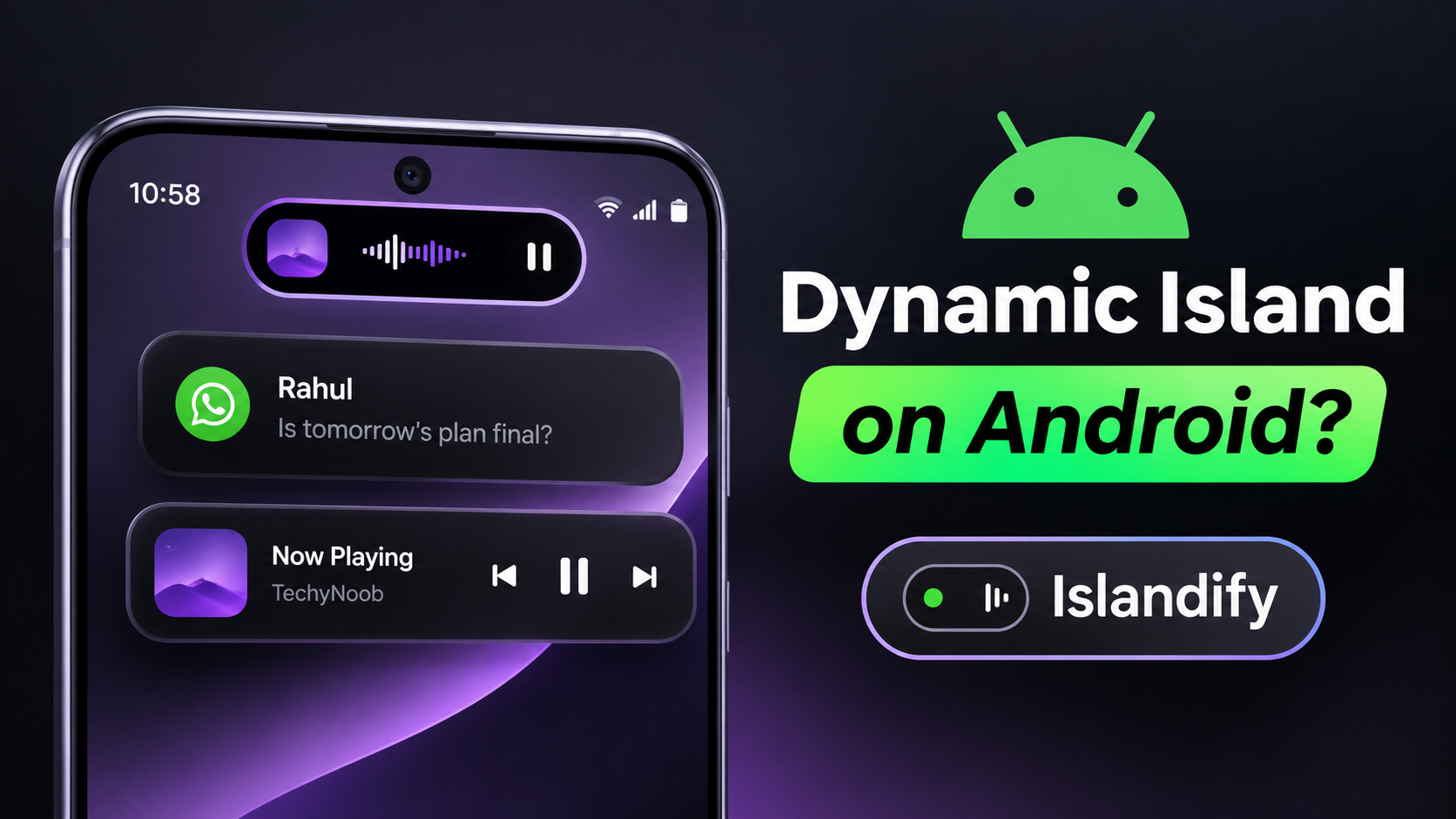
The physical design of modern smartphones has largely plateaued, with manufacturers utilizing edge-to-edge displays interrupted only by a small camera cutout. To make this hardware limitation feel like an intentional design choice, software developers began creating interactive graphical elements that expand and collapse around the camera punch hole. This concept, popularized as the Dynamic Island, completely revolutionized how users interact with background tasks and incoming notifications. While this highly sought-after interface element is typically exclusive to specific flagship operating systems, the Android aftermarket development community has quickly stepped in to bridge the gap. Enter Islandify, an incredibly robust, deeply customizable application that seamlessly integrates a highly functional, animated notification pill directly into your Android device, transforming a static camera cutout into a powerful multitasking hub.
Understanding the Architecture and Acquisition
Islandify distinguishes itself from other interface customization tools by being a completely open-source project. Hosted directly on GitHub, the application boasts an incredibly transparent development cycle, allowing users to verify its safety and rely on continuous community-driven updates. This open-source nature ensures that the package is remarkably lightweight, meaning it will not unnecessarily consume vital storage space or aggressively drain the device's battery in the background. Because it modifies core interface behaviors, users must download the APK file directly from the developer's official repository rather than traditional app stores. Once downloaded to the local file manager, the installation process requires the user to briefly permit the installation of applications from unknown sources within their system settings. The installation takes merely seconds, leaving the user ready to configure their brand new dynamic interface.
Configuring Essential System Permissions
For an application to flawlessly draw interactive graphical elements over the top of other active applications, it requires a specific set of elevated Android system permissions. Upon launching Islandify for the very first time, users are guided through a mandatory setup screen. First and foremost, the Accessibility service must be enabled; this is the core engine that allows the application to actively detect system events and physically draw the pill over the screen. Secondly, Notification access must be explicitly granted so the software can intercept incoming messages and display them within the animated banners. To enable premium features like headphone connection pop-ups, users must also grant the Bluetooth nearby devices permission. Finally, to ensure that the Android memory management system does not aggressively kill the island while it is running in the background, users must navigate to their battery settings and set the application's battery usage to completely unrestricted.
Video Demonstration
Core Capabilities: Notifications, Media, and Calls
Once properly configured, the true power of Islandify becomes immediately apparent. Within the Activities tab, users are granted total control over exactly what system events trigger the island to expand. When a text message or application notification arrives, the black pill smoothly expands into a beautiful banner, allowing users to read the alert and even reply directly using an on-screen keyboard without ever leaving their current application. Media playback is handled exceptionally well; when music is playing, the pill displays high-quality album art alongside a continuously moving audio sound wave, complete with intuitive playback controls. Telephone calls are deeply integrated as well. Users are provided with sleek, non-intrusive controls for incoming, outgoing, and ongoing calls directly inside the dynamic pill, ensuring that the phone dialer never aggressively takes over the entire display during an important task.
Advanced Utilities and the Innovative Bubble System
Beyond basic notifications, the software packs an incredible amount of utility tracking. When the device is plugged into a power source, a slick charging banner instantly appears, displaying the precise charging wattage and an estimated time left until the battery reaches full capacity. It also seamlessly tracks active countdown timers, live navigation directions, and background delivery updates. Furthermore, it displays connected Bluetooth earbuds battery levels, provides low battery warnings precisely at twenty and ten percent, and houses quick toggles for silent mode and the flashlight. To manage overwhelming notification traffic, Islandify utilizes an ingenious bubble system. If multiple messages arrive simultaneously, the secondary alerts wait patiently as small graphical bubbles positioned right next to the main pill. Users can tap a bubble to open its specific message card, swipe upward to hide it back into its compact bubble state, or simply swipe left or right to completely dismiss the message from the screen.
Aesthetic Customization and Language Support
Recognizing that Android users demand total control over their device's aesthetics, the developer has included an exhaustive suite of customization options. Users are never locked into a default layout. The settings menu allows for precise adjustments to the physical size of the pill, ensuring it perfectly masks the specific camera cutout on any hardware model. Users can fine-tune the banner expansion width, adjust the overall graphical opacity, and scale the text size for optimal readability. Even the accent colors can be individually customized to perfectly match the user's current wallpaper or custom icon pack. Additionally, the application caters to a diverse user base by natively supporting both English and Hindi languages, ensuring the settings menus are accessible to a wider global audience.
Final Verdict
Islandify stands out as easily one of the most refined, feature-rich, and stable dynamic island applications available within the Android ecosystem today. By perfectly balancing smooth, high-framerate animations with deep, practical system utilities, it completely transforms how a user interacts with their smartphone. Its lightweight open-source architecture, combined with the incredibly innovative bubble notification management system, makes it an absolute must-have installation for anyone looking to radically refresh and modernize their daily interface.
Discussion (0)
Post a Comment
No comments yet. Be the first to share your thoughts!