
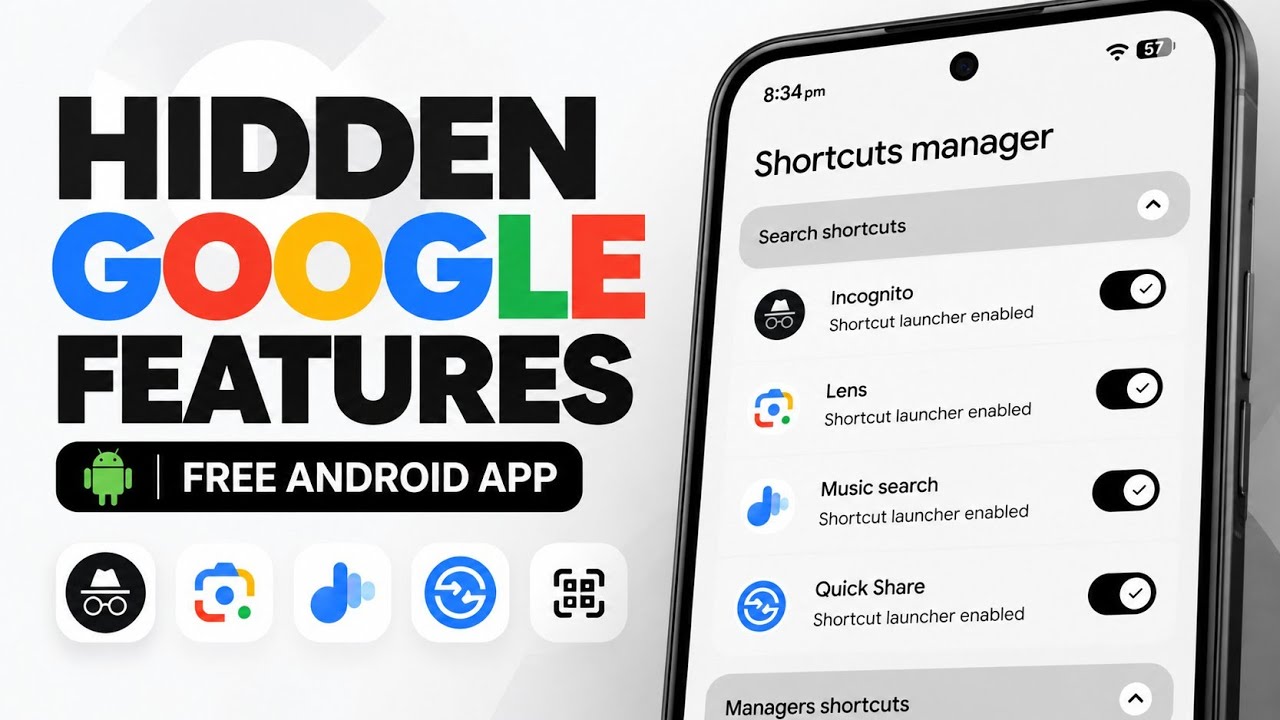
Google Shortcuts Launcher is an open-source Android utility that turns selected Google app actions into individual shortcuts. Instead of opening an app and navigating through several menus, users can enable direct icons for actions such as Incognito mode, Google Lens, Music Search, and standard Google Search. The app also groups shortcuts for managers, shopping, games, and other utilities.
This article follows the TechyNoob video script. The script mentions a developer GitHub page but does not provide its exact URL or the video URL, so those links are not invented here.
What is Google Shortcuts Launcher?
The app opens into a clean interface called Shortcuts Manager. Its options are grouped by category, and the user enables an action by toggling the switch beside it. Depending on the shortcut, the action can be made available in the app drawer or through Quick Settings. This is especially useful for people who regularly use a few Google features and want to reach them with fewer taps.
Search shortcuts
The Search shortcuts category provides direct access to Google Search actions:
- Incognito mode — open an Incognito browsing session more directly.
- Google Lens — launch visual search and recognition.
- Music Search — identify music playing nearby.
- Google Search — open the standard Google search experience.
Enable only the shortcuts that fit your routine. Their exact behavior can depend on the relevant Google app being installed and available on the device.
Managers shortcuts
The Managers shortcuts category brings several management destinations closer to the launcher:
- Collections — access saved Collections.
- Files — open the Files area.
- Games — access a dedicated Games hub.
- Passwords — open the Passwords manager.
Shopping, travel, and classic Google games
The Shopping shortcuts section includes Shopping and Travels. The Games shortcuts section allows classic Google mini-games to be placed directly on the home screen or made available as shortcuts:
- Cricket
- Minesweeper
- PAC-MAN
- Snake
- Solitaire
These shortcuts can make casual games easier to open without first searching for them or navigating through another Google page.
Other shortcuts
Under Others shortcuts, the script shows quick access options for Google Assistant, Finances, Quick Share, a dedicated QR Scanner, and Weather. These options broaden the app beyond search and management features.
Quick Settings integration
The app can also expose supported actions as Quick Settings shortcuts. This means users may be able to pull down the notification shade and launch actions such as Lens or Quick Share from the quick-toggle area. The precise presentation can vary with Android version and the device manufacturer.
Settings and customization
- Launch delay — configure a delay before a selected action opens.
- Default digital assistant — set the app as the default digital assistant for deeper integration, where supported.
- Force system theme — choose whether the manager follows or forces a system theme.
- Hide the manager app — hide the manager itself from the app drawer after configuration for a more minimal setup. Before hiding it, make sure you know how to access its settings again.
Video
Installation guide
- Visit the developer’s official GitHub project and download the APK release. The source script does not include the exact repository URL.
- Open your file manager and go to the folder where the APK was saved, such as Downloads.
- Tap the APK. If Android asks for permission to install unknown apps, allow that permission for the file manager you are using.
- Tap Install and wait for Android to complete installation.
- Open Google Shortcuts Launcher once Android confirms the installation succeeded.
- In Shortcuts Manager, toggle on the shortcuts you want to use.
- Configure Quick Settings actions and review the launch delay, assistant, theme, and hide-manager settings.
Recommended setup and troubleshooting
- Start with a small set of shortcuts and add more only when useful.
- Test each enabled shortcut to confirm the related Google service is available.
- If an action fails, check whether its related Google app is installed and updated, and whether the feature is available on your device or in your region.
- If you plan to hide the manager app, first confirm you can reopen or manage it another way.
- If installation fails, verify that the APK came from the developer’s official source and check Android’s installation prompts.
Privacy and safety
Install the APK only from a source you independently trust. Grant the unknown-app installation permission only to the installer app you are using, and review that permission afterward if appropriate. The shortcuts lead to Google services, so the privacy and account behavior of each destination remains subject to those services.
Download Link & Credits
Download Google Shortcuts Launcher
Conclusion
Google Shortcuts Launcher is a practical convenience tool for users who want one-tap access to selected Google features. Its categorized shortcut manager, classic game shortcuts, Quick Settings support, and customization options can reduce the number of steps needed for common actions. Verify the official release and compatibility details before installing.
Discussion (0)
Post a Comment
No comments yet. Be the first to share your thoughts!