
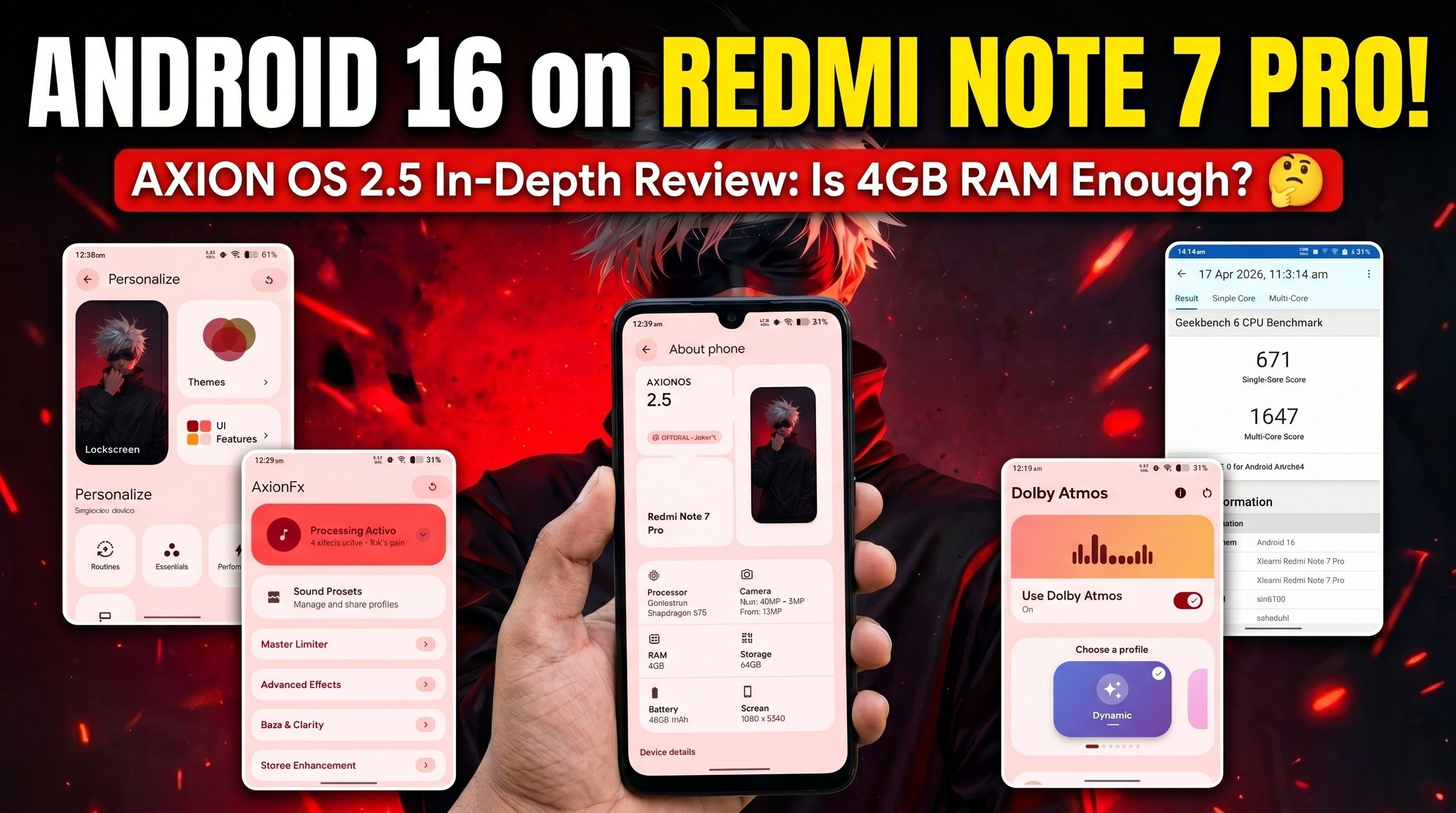
The Redmi Note 7 Pro remains one of the most resilient budget devices in the custom ROM community. Years after its official software support ended, independent developers continue to breathe new life into this hardware. The latest milestone for this classic device is the port of Axion OS 2.5, a custom ROM based on the cutting-edge Android 16 QPR2 platform. Packed with the April security patch, this software brings modern functionality, extensive customization, and an elegant visual overhaul to a phone released years ago.
However, running a major operating system update on older internal components introduces specific hardware constraints. Let’s break down everything this update brings to the table, from user interface aesthetics to day-to-day performance realities.
Understanding the Hardware Limitations
Before diving into the massive feature set, an honest assessment of system performance is essential. When running modern Android 16 architectures on older chipsets, memory constraints become a primary factor.
On the 4GB RAM variant of the Redmi Note 7 Pro, Axion OS 2.5 introduces noticeable system lag during intensive daily multitasking. While previous, lighter operating system builds handled basic navigation smoothly, the background processes required for Android 16 QPR2 create a heavy performance footprint on 4GB models. Users who own the 6GB RAM variant generally experience a more stable and responsive environment due to the additional memory headroom.
Core System Specifications & Android 16 Visuals
Navigating to the system architecture sub-menus confirms the core specifications of this build. The platform natively reports itself as Axion OS version 2.5, running directly on top of the Android 16 QPR2 codebase. Security is fully updated via the latest April patch level, which keeps the device protected against discovered system-level vulnerabilities.
As a nod to pure Android enthusiasts, rapidly tapping the Android version number unlocks the official Android 16 easter egg animation. Beyond visual novelties, the network stack contains a vital infrastructure upgrade: pre-configured, system-level Private DNS settings. This addition simplifies secure browsing and network-wide ad blocking right out of the box, removing the need for third-party application management.
The Customization Architecture: Personalize Hub
The definitive highlight of Axion OS 2.5 is its centralized configuration dashboard, known as the Personalize hub. The system divides its visual and operational tweaks into distinct functional areas:
- Lock Screen Aesthetics: Users can activate Edge Light animations to illuminate the display borders during incoming notifications. For audio lovers, a responsive Pulse Visualizer can overlay a live audio graphic on the ambient display or lock screen during media playback. The system also supports Media Art, which expands album covers across the background space.
- Theme Management: The ROM offers robust granular styling, allowing changes to status bar icon themes, native icon geometric shapes, customized back gesture animations, and varied battery style layouts.
- Status Bar & UI Features: Users can modify clock positions and network traffic speeds. A notable addition is the Dynamic Bar—a smart system chip mimicking a pill-shaped status overlay that scales seamlessly to indicate live background tasks, active events, or background timers.
Watch the full tutorial here on my Youtube channel:
Advanced Tooling, Sound, and Gaming Optimization
Audio control receives a substantial upgrade via Per-App Volume controls. This feature isolates individual application volumes, preventing different media sources from clashing. Furthermore, Multi Audio Focus allows multiple audio tracks to play simultaneously rather than pausing background applications.
For input controls, the system integrates physical Shake Gestures alongside conventional Three Finger Gestures to trigger rapid actions such as custom screenshots.
The utility section houses specialized features aimed at security and performance enthusiasts:
- Essential Notifications: Prioritizes critical applications, grouping them firmly at the top of the notification shade.
- GameSpace: A dedicated performance management dashboard designed to balance hardware resources during active gaming sessions. It includes options for device spoofing to unlock higher frame rates.
- TrickyStore & Play Integrity Fix: Integrated controls aimed at managing keyboxes for key attestation and build fingerprint configurations, helping advanced users maintain device state integrity.
Thermal, Performance, and Audio Benchmarks
Under the performance sub-menu, the system offers distinct operational states: a raw Performance Mode and a Balanced Mode. Users looking for granular control can manually alter CPU clock frequencies for both the low-power little clusters and the high-performance big clusters. Multitasking is further supplemented by a quick-access utility Sidebar and dedicated PC Mode display parameters.
Visually, the system is backed by the AxBravia Engine, which supports Vivid, Natural, and Cinema color calibration layouts. The underlying system appearance pulls deeply from modern design languages, featuring a vast collection of minimal wallpapers, custom widget support, lock screen shortcut maps, and reliable double-tap gestures to control the sleep state of the screen.
| Metric / Feature | Test Result & Status |
| Geekbench 6 Single-Core | 671 |
| Geekbench 6 Multi-Core | 1647 |
| Biometric Security | Face Lock & Fingerprint working reliably |
| Audio Modules | Built-in AxionFX & Dolby Atmos |
| SafetyNet / Integrity | Fails by default (Requires manual modules) |
Final Thoughts
Axion OS 2.5 stands as an impressive technical showcase of what is possible on legacy hardware, successfully bringing Android 16 QPR2 to the Redmi Note 7 Pro. It provides a premium feature set, remarkable audio tools, and unprecedented user control. However, the hardware cost is real. If you are using the 4GB memory variant, prepare for a heavier software experience that impacts speed. For those with the 6GB variant, this ROM delivers an incredibly deep, customizable upgrade path well worth exploring.
Subscribe to my Youtube channel for daily android tips tricks and tutorials: TechyNoob
Discussion (0)
Post a Comment
No comments yet. Be the first to share your thoughts!