The Evolution of Mobile Input and Exclusive Ecosystems
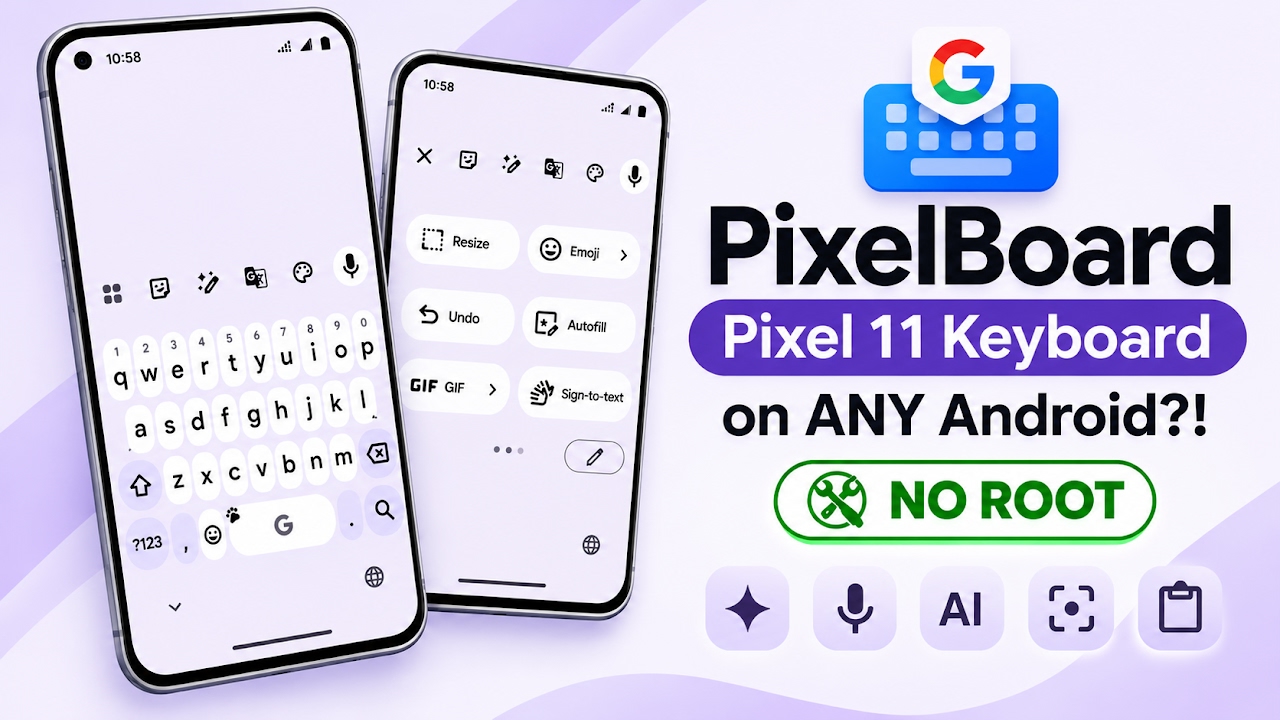
The mobile keyboard is arguably the most critical component of any smartphone operating system, serving as the primary bridge between user intent and digital execution. Over the years, Google’s official Gboard application has dominated the Android landscape, offering unparalleled predictive text, multi-language support, and seamless integration with the broader Google ecosystem. However, a growing trend within the mobile industry involves hardware manufacturers locking their most advanced software features behind specific, premium device models. Google has actively participated in this strategy, reserving cutting-edge artificial intelligence writing tools and advanced voice dictation exclusively for their flagship Pixel 11 series smartphones. This artificial software fragmentation leaves millions of capable Android users without access to the latest productivity enhancements. Fortunately, the Android aftermarket development community has responded with PixelBoard, a brilliant software modification designed to bridge this exact gap.
Understanding the PixelBoard Architecture and Morph Patches
PixelBoard is not built from scratch; rather, it is a highly sophisticated, ultra-clean enhancement of the official Google Keyboard framework. What makes this specific modification incredibly exciting is that it requires absolutely no root access, unlocked bootloaders, or complex system-level flashing to operate. Instead, it utilizes advanced morph patches. For users familiar with how the ReVanced project modifies the YouTube application, PixelBoard operates on a very similar principle. The developers take the core, stable foundation of the official Gboard application and carefully strip away all unnecessary bloatware and background telemetry. They then inject specialized morph patches that trick the application into unlocking the advanced capabilities normally reserved for the Pixel 11 series. Because it is built directly upon Google's official, highly optimized framework, the resulting application is incredibly reliable, fast, and perfectly safe to utilize as a daily driver keyboard for sensitive communication.
Acquiring the Application and Installation Procedure
Since this application is a modified version of a core system component, it cannot be hosted on or downloaded directly from the official Google Play Store. Users must venture to the developer's official open-source GitHub repository to obtain the installation package safely. Once the specific APK file is downloaded directly to the device, the installation process is identical to side-loading any standard third-party application. Users simply need to open their preferred file manager, navigate to their local downloads folder, and locate the freshly downloaded PixelBoard APK file. Before tapping the file to initiate the installation, it is crucial to ensure that the Android operating system has been granted permission to install applications from unknown sources. Once authorized, hitting the install button will unpack the highly optimized package in just a few brief seconds, offering zero-restart instant activation right out of the box.
Video Demonstration
System Activation and Settings Configuration
After the application has been successfully installed, it must be manually activated and set as the primary input method. Users need to jump into their main Android system settings and navigate to the keyboard configuration page, typically found under the language and input section. Here, users will see their current default keyboard—often the standard, pre-installed Gboard. To complete the transition, users must toggle on the newly installed PixelBoard and disable the stock Gboard to prevent any system conflicts or overlapping input methods. Opening the PixelBoard settings page reveals a deliberate and brilliant design choice: it retains the exact same familiar, user-friendly layout of the official application. All standard preferences, theme configurations, dictionary settings, and glide typing options remain exactly where users expect them to be. The learning curve is entirely nonexistent, but digging deeper into the advanced menus reveals the newly unlocked, supercharged configuration options provided by the morph patches.
Next-Generation User Interface and Advanced Productivity Features
Switching over to a standard notepad application immediately highlights the dramatic visual overhaul provided by this modification. While the standard official keyboard utilizes a slightly rounded square aesthetic that has remained unchanged for years, PixelBoard introduces the beautiful Material 3 Expressive Rounded Keys layout. This modern, visually stunning interface significantly improves the typing experience and overall graphical cohesion on modern Android builds. But the true value of PixelBoard lies far beyond its aesthetic upgrades. It integrates a powerhouse of productivity tools, most notably the Gemini Rambler Natural Voice Dictation framework. This specific feature offers flawless, lightning-fast speech-to-text conversion that dramatically outperforms standard voice typing. Users also gain immediate access to the AI Writing Assistant and Writing Tools V2, which feature modern spell checker suggestion chips and advanced grammar checking right above the number row.
Additional Utilities and Device Integration
The feature set continues to expand with several highly requested utilities that streamline daily smartphone usage. If a user needs to quickly extract physical text from the real world, the integrated Scan Text Camera OCR tool allows them to simply point their device's camera at a document and have the text instantly digitized directly into their text field. For visual communication, the application includes the much-anticipated Emoji Palette V2, which finally restores the highly requested emoji size slider and introduces a more vibrant color palette for standard emojis. Power users will also heavily appreciate the Super Insert Quick Hub, which speeds up the attachment of files and media, alongside floating screenshot suggestions that appear instantly after capturing the screen. Finally, for users operating Samsung and Vivo hardware, this modification includes seamless, native clipboard history synchronization, effectively fixing a long-standing compatibility issue with standard third-party keyboards.
Final Verdict
PixelBoard stands as an absolute triumph in the Android customization community. By cleverly utilizing morph patches to bypass arbitrary hardware restrictions, it delivers the ultimate, premium Pixel 11 typing experience to any Android device without the hassle or risk of rooting. Its combination of the stunning Material 3 Expressive interface, unparalleled Gemini AI voice dictation, and advanced productivity tools make it a mandatory upgrade for anyone looking to supercharge their daily communication and text entry workflow.
Discussion (0)
Post a Comment
No comments yet. Be the first to share your thoughts!