
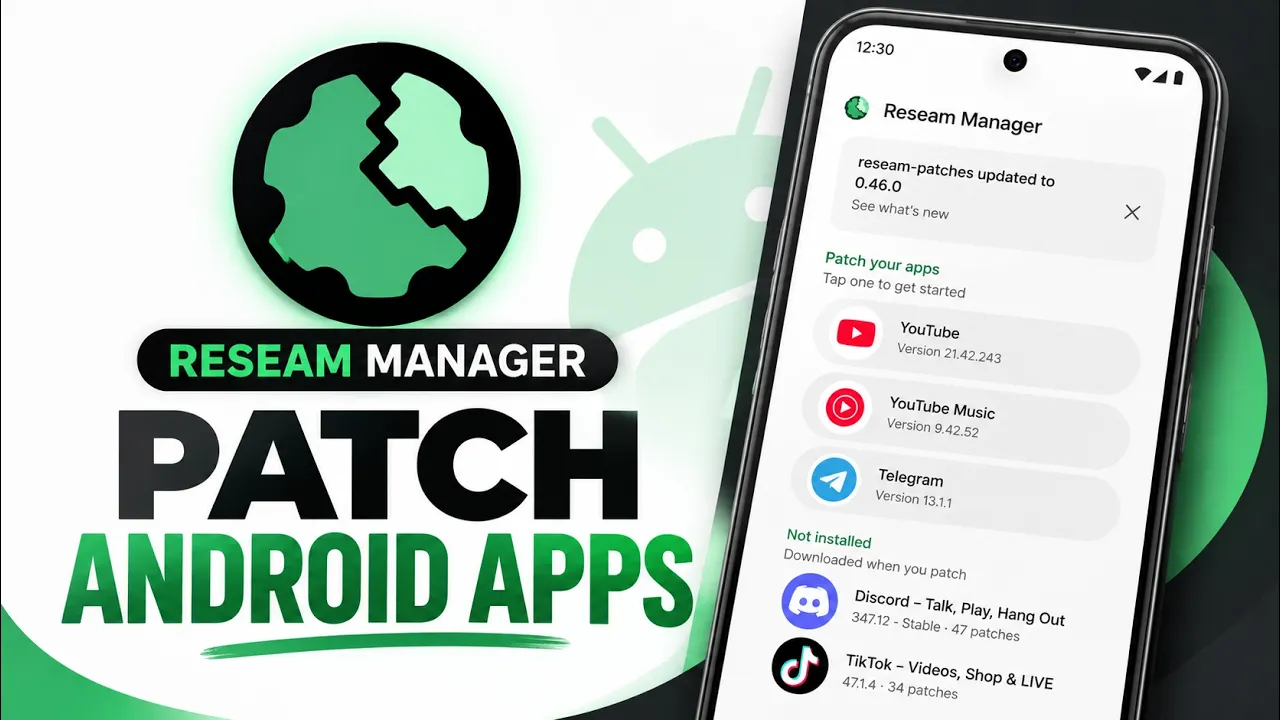
Reseam Manager is an open-source Android tool for patching apps directly on your device. Choose an app, select the patches you want, and build a customized patched copy. It is designed for Android users who want to adjust app behavior, add features, or remove unwanted elements without performing the patching process on a separate computer.
Main screen and supported app lists
The main screen is organized around “Patch your apps.” Installed apps available for patching appear with their current version numbers; examples include YouTube, YouTube Music, and Telegram. A separate “Not installed” section lists other apps for which patches are available, including Discord, Instagram, Reddit, and Twitter. The number of available patches is shown for each listed app.
Patch sources and automatic updates
Settings lets you manage patch sources and enable automatic patch updates whenever the manager starts. There is also an option to allow untested patch versions. Use untested versions cautiously because they may be less reliable or incompatible with the installed app version.
Signing key and saved APK files
Under Files, the manager provides access to its signing key, which is automatically created during the first patching operation, and to previously patched APK files. Keep the signing key secure and preserve it if you may need to manage patched builds later.
Permissions, notifications, and background operation
Device settings include permissions required to install apps, send notifications when a lengthy patching process finishes, and allow the manager to run in the background. Grant only the permissions needed for the features you intend to use.
Mount with root
Rooted devices have a dedicated “Mount with root” option intended to run patched apps over their originally installed system apps. This is an advanced feature that depends on root access and device configuration. Understand the risks of modifying or overlaying system applications before enabling it.
Installation guide
- Download the APK from the official project page linked below.
- Open your file manager and locate the downloaded APK, usually in Downloads.
- Tap the APK. If Android requests permission to install unknown apps, allow it for the file manager you are using.
- Return to the installer and tap Install.
- Open Reseam Manager after installation completes.
- Choose an app from the installed list, review the available patches, and select the ones you need.
- Build the patched app and follow the manager’s prompts to install or access the resulting APK.
Recommended workflow
- Read each patch description and check compatibility with the installed app version.
- Start with a small number of patches so unexpected behavior is easier to diagnose.
- Back up important app data and retain the original APK where practical.
- Avoid untested patches on apps you rely on daily unless you understand the risk.
- Keep the signing key safe and preserve any patched APKs you may need.
- If the app behaves unexpectedly, consider returning to the original app and testing patches individually.
Troubleshooting
- Installation blocked: review Android’s install-unknown-apps permission for the file manager or browser used to open the APK.
- Patch unavailable: check the app version and patch-source settings.
- Patching fails: confirm the patch supports your app version and consider disabling untested versions.
- Patched app will not install over the original: app signing differences can affect replacement or updating. Back up data and review the app’s instructions before removing anything.
- Root mount option unavailable: root access and compatible device configuration may be required.
Safety and limitations
Patching changes application packages and can affect stability, compatibility, updates, or app behavior. Use patches only when you understand their purpose and have permission to modify the application. Root-related features can affect system behavior, so proceed carefully and maintain a recovery plan.
Download, project, and video
Download the APK:
Official project and source code:
Reseam Manager official Git repository
Watch the video:
Conclusion
Reseam Manager brings app patching tools directly to Android. Its app lists, patch-source controls, automatic updates, signing-key management, saved APK access, notifications, background options, and root mount feature offer flexibility for users who want more control over app behavior. Choose patches carefully, back up important data, and use advanced root features only when you understand the risks.



Discussion (0)
Post a Comment
No comments yet. Be the first to share your thoughts!