
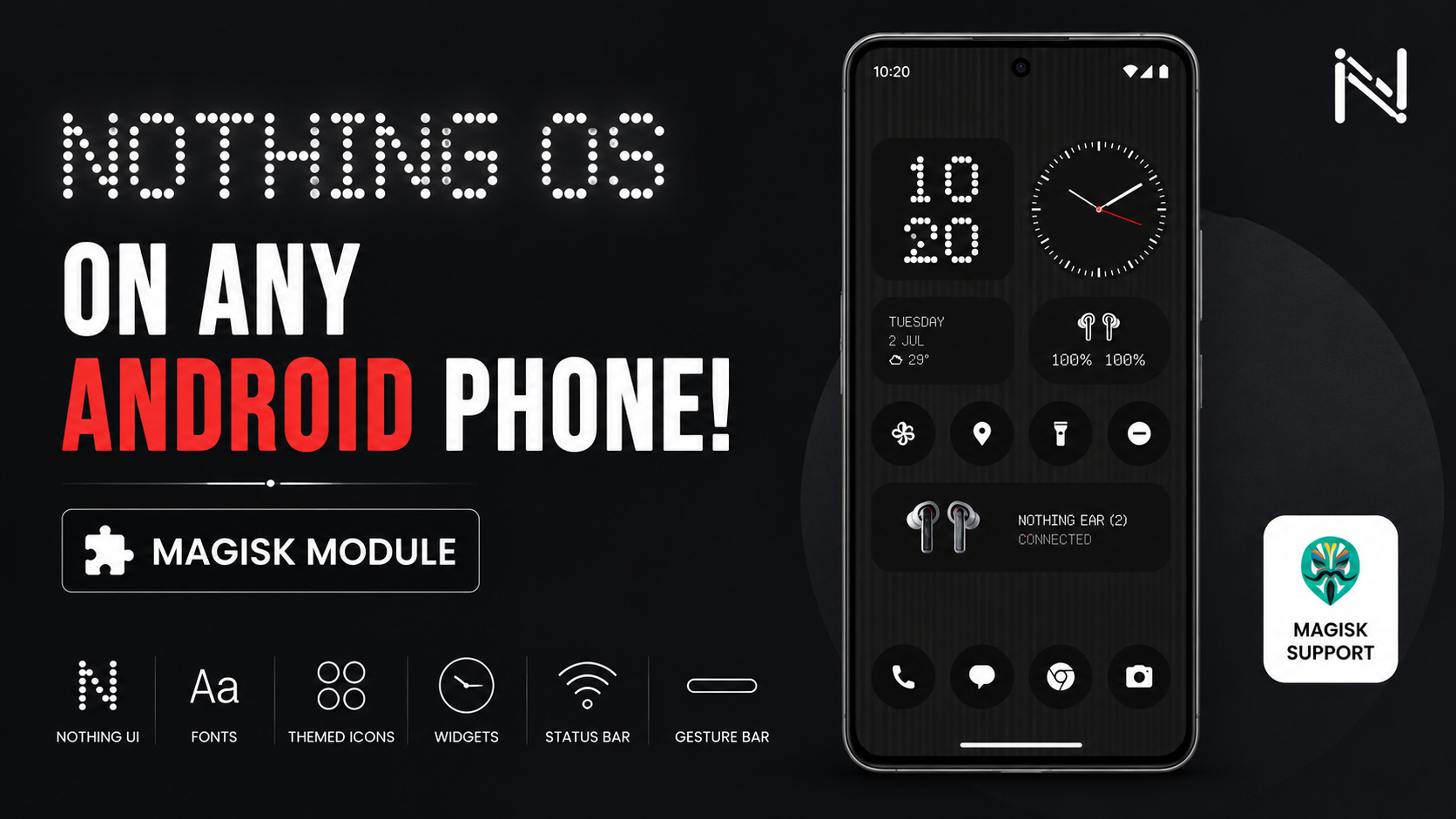
Nothing OS has a very recognizable design. The dot-matrix typography, minimalist interface, unique widgets, monochromatic icons, and distinctive system elements give Nothing phones a look that stands out from standard Android.
If you have a rooted Android phone and want to recreate that style without replacing your entire ROM, you can use the Nothing OS Experience Magisk module.
In this guide, I’ll show you how to install the module, reboot the phone, verify that it is active, and then check out the Nothing-style interface and applications.
YouTube Video:
What You Need
The main requirement for this setup is a rooted Android device with Magisk installed and working.
You’ll also need the Nothing OS Experience ZIP package.
Download the ZIP and save it somewhere convenient, such as your phone’s Downloads folder.
Download: DOWNLOAD NOTHING OS EXPERIENCE
Before flashing anything, make sure the ZIP has finished downloading properly. A corrupted archive can cause installation problems, so it’s better to check the file first.
Check the ZIP File
Open your file manager.
Go to your internal storage and open the Downloads folder.
Find the Nothing OS Experience ZIP package.
Take a moment to make sure the archive is completely downloaded and isn’t corrupted. Once you’re satisfied that the file is ready, leave it in the Downloads folder so Magisk can access it easily.
Now we can start the installation.
Install the Nothing OS Module Through Magisk
Open Magisk from your app drawer.
Go to the Modules section.
At the top of the page, tap Install from storage.
Your file picker will appear. Navigate to the Downloads folder and select the Nothing OS Experience ZIP.
Magisk will begin the flashing process.
During installation, you’ll see the installer running its scripts and applying the required system modifications. The setup handles the framework, fonts, and launcher-related components needed for the Nothing OS-style experience.
Let the installer finish completely.
Once Magisk reports that the installation has completed successfully, you’ll see the reboot option.
Reboot Your Phone
Tap Reboot.
Your phone will restart and apply the changes from the module.
Allow the device to boot normally. Once Android loads, unlock the phone and open Magisk again.
We’re going to verify that the module is actually active before checking the visual changes.
Verify the Module
Open Magisk → Modules.
Find the Nothing OS Experience module in the list.
Make sure it is installed, enabled, and running without any errors.
Once everything looks correct, you can return to the home screen and start exploring the new interface.
Explore the Nothing OS Experience
The biggest change is the overall visual style.
You’ll find Nothing-inspired typography, wallpapers, status bar elements, and the distinctive gesture bar. The setup also includes Nothing-style applications and widgets.
Long-press an empty area on your home screen and open the widget menu.
Here you can check out the available Nothing-style widgets, including analog-style clocks, dot-matrix digital clocks, a media player, and weather widgets.
The combination of these widgets with the new fonts and wallpapers gives the home screen a much more recognizable Nothing-inspired appearance.
The status bar also receives changes.
You can see Nothing-style battery, Wi-Fi, and signal icons, along with the updated gesture bar at the bottom of the screen.
Nothing Apps and Pixel Launcher Icons
The setup also includes Nothing-style core applications such as Nothing Clock, a minimalist Gallery, and Nothing widgets.
If you’re using Pixel Launcher, the custom themed icon support is another useful part of the setup.
Compatible third-party application icons can be adapted to match the overall Nothing-inspired design, giving your home screen a more uniform appearance instead of having completely different icon styles everywhere.
You can also adjust the launcher grid density to change how the icons and widgets are arranged on your home screen.
This makes it easier to create a layout that fits your preferred style rather than simply using the default launcher arrangement.
Final Thoughts
With the Nothing OS Experience Magisk module installed, you can give a rooted Android phone a completely different visual identity without replacing the entire ROM.
The installation is straightforward: download the ZIP, verify the file, flash it through Magisk, reboot, confirm the module is active, and then explore the new fonts, wallpapers, icons, widgets, status bar, gesture bar, and launcher customization.
If you enjoy experimenting with Android customization, this is a simple way to bring the distinctive Nothing-inspired design to an existing rooted setup.
YouTube:
Download: DOWNLOAD NOTHING OS EXPERIENCE

Discussion (0)
Post a Comment
No comments yet. Be the first to share your thoughts!