Introduction to Mobile Hardware Monitoring
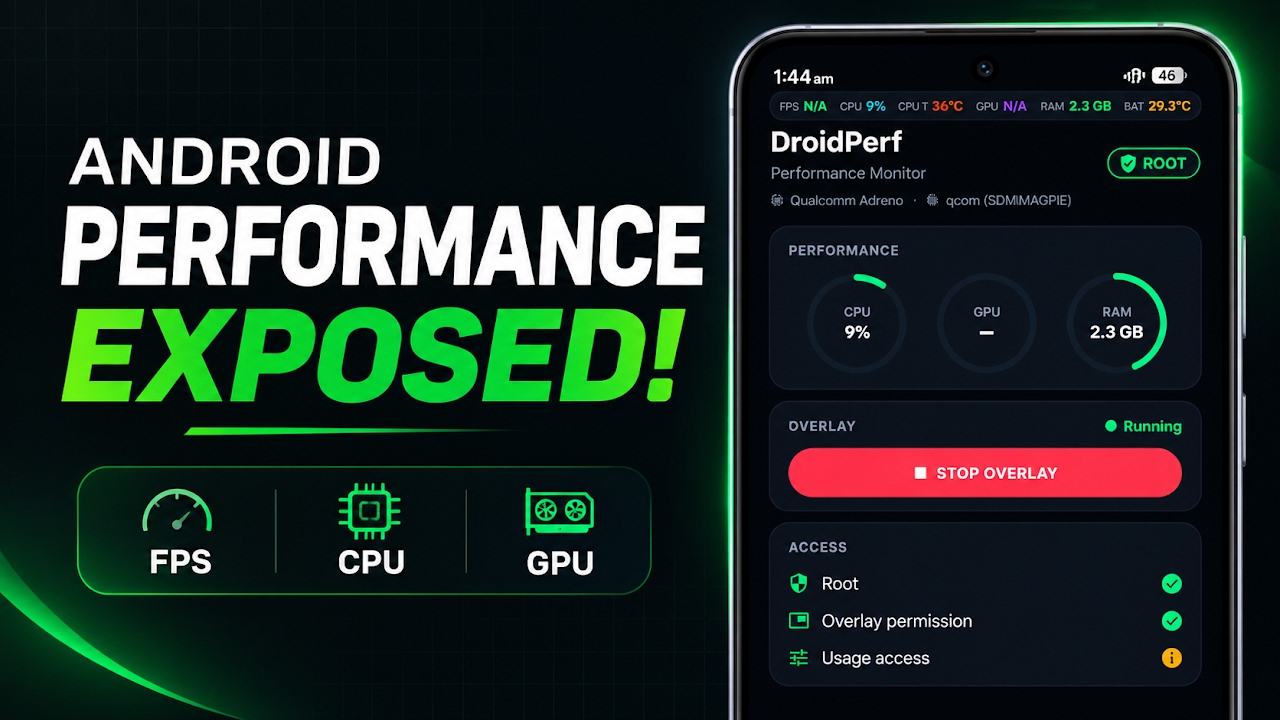
In recent years, the mobile gaming landscape has evolved at an unprecedented pace, with modern smartphones packing incredibly powerful processors and graphics chips that rival dedicated gaming consoles. As the hardware becomes more sophisticated, power users, developers, and mobile gamers have developed a growing need to monitor their device's underlying performance metrics during intensive tasks. While desktop PC gamers have long relied on sophisticated overlay software to track system health and performance, Android users have typically been stuck with basic, often inaccurate monitoring applications. DroidPerf emerges as a revolutionary solution to this problem. It is an incredibly powerful, lightweight, and real-time performance overlay designed specifically for the Android operating system. This tool brings desktop-grade hardware telemetry to mobile devices, allowing users to monitor critical system behavior precisely when it matters most.
The Advantage of Direct SurfaceFlinger Integration
To truly understand the value of DroidPerf, it is essential to look at how it captures its data compared to traditional monitoring applications. Most standard overlay apps on the market rely on basic Android render callbacks and generic system application programming interfaces to estimate frame rates and system load. This often results in delayed, interpolated, or simply inaccurate data, especially during heavy gaming sessions where the system is under extreme stress. DroidPerf bypasses these limitations entirely by hooking directly into Android's graphics compositor, known as SurfaceFlinger. By operating at this deep system level, the application provides true frame delivery metrics. It measures the exact sub-millisecond latency of rendered frames, offering an unparalleled level of accuracy. Furthermore, it strictly adheres to a zero-fabrication approach; if a specific hardware sensor is restricted by the device manufacturer's firmware, the application will transparently display N/A rather than guessing or generating fake numbers to fill the void.
Acquiring the Application and Initial Setup
Because of its deep system-level integration and advanced capabilities, DroidPerf is not distributed through standard application storefronts. Users looking to utilize this powerful tool must acquire the installation file directly from the developer's official GitHub repository. Once the specific APK file has been downloaded, the setup process is quite straightforward. Users simply need to open their preferred Android file manager and navigate directly to their device's local downloads folder. The DroidPerf APK is intentionally designed to be an extremely small and lightweight file, ensuring it takes up practically zero space on the internal storage while minimizing background resource consumption. Before proceeding with the installation, users must ensure their device settings are properly configured to allow application installations from unknown sources, a standard requirement when side-loading any software outside of the official ecosystem. Tapping the APK file will initiate the installation process, which typically finishes in just a few highly optimized seconds.
Granting Crucial System Permissions
For the on-screen overlay to function properly and gather its deep system metrics across all applications, users must grant it a series of key permissions immediately after the first launch. The most obvious requirement is the display over other apps permission. This is absolutely mandatory, as it allows the performance head-up display to physically render its data on top of active games and fullscreen applications without being paused by the Android memory management system. Secondly, users must grant usage access, which provides the tool with the ability to accurately detect the specific foreground application package currently running. Finally, for those who want to unlock the absolute maximum potential of the software, authorizing superuser root access is highly recommended.
Video Demonstration
Understanding the Three Privilege Access Modes
DroidPerf is uniquely designed to accommodate various types of Android users by offering three distinct privilege access modes: Standard, Shizuku, and Root. Standard mode is designed for unrooted devices and provides a solid foundation of basic hardware telemetry, including overall CPU usage, general RAM consumption, and basic battery statistics. However, stepping up to Shizuku mode or full Root access unlocks the true potential of the application. These elevated privilege levels are what enable the direct integration with SurfaceFlinger for sub-millisecond latency tracking and true game FPS monitoring. The elevated modes also unlock the ability to read highly specific vendor data, such as detailed GPU loads for Adreno processing chips, which are heavily utilized in modern flagship smartphones.
Deep Dive into Hardware Telemetry Features
When running with optimal permissions, the head-up display provides an incredible wealth of live data. The central processing unit metrics go far beyond simple overall usage; users can view detailed, per-core CPU utilization alongside real-time frequency clock speeds. This is incredibly useful for identifying thermal throttling or poorly optimized applications that max out a single processor core. The graphics processing unit data provides similar depth, showing real-time rendering loads. Memory management is another strong suit, with the overlay offering a detailed RAM breakdown that categorizes memory into active, cached, and available segments, rather than just showing a single arbitrary number. For battery and thermal monitoring, the application provides crucial telemetry including real-time voltage tracking, current flow, and total wattage draw, allowing gamers to monitor their exact power consumption during extended play sessions.
Customizing the Visual Overlay
Despite the massive amount of data being processed and displayed, the developer has ensured that the visual presentation remains clean and highly customizable. Users are not forced into a single, cluttered layout. Instead, DroidPerf offers multiple display styles to suit different preferences and screen sizes. The standout option is the RTSS RivaTuner style, heavily inspired by the legendary PC monitoring software, providing a detailed and highly structured block of data. For those who prefer a more subtle approach, the Classic compact mode and Minimal modes allow users to keep an eye on essential metrics without obstructing crucial gameplay elements or user interface buttons in their favorite mobile games.
Pros and Cons
Pros:
- Provides incredibly accurate, real-time hardware telemetry directly on the device display.
- Utilizes SurfaceFlinger integration for true frame delivery metrics and sub-millisecond latency tracking.
- Features a strict zero-fabrication approach, ensuring only genuine data is displayed.
- Offers multiple access modes including Standard, Shizuku, and Root for wide device compatibility.
- Includes highly customizable layouts inspired by desktop PC monitoring software.
Cons:
- Requires Root or Shizuku access to unlock the most advanced and accurate tracking features.
- Sideloading the application from GitHub is required, as it is not available on standard app stores.
- Advanced metrics may display as unavailable if restricted by aggressive device manufacturer firmware.
Final Verdict
DroidPerf stands out as easily one of the most accurate, transparent, and powerful performance monitoring tools available for the Android ecosystem today. Its refusal to interpolate missing data and its direct hook into the system's graphics compositor make it an absolute must-have utility. Whether you are a competitive mobile gamer tracking frame drops, a developer optimizing a new application, or simply a power user who wants total visibility into your hardware's behavior, this lightweight overlay delivers desktop-class monitoring without compromising device performance.
Discussion (0)
Post a Comment
No comments yet. Be the first to share your thoughts!