
Introduction: The Evolution of Android Status Bar Customization
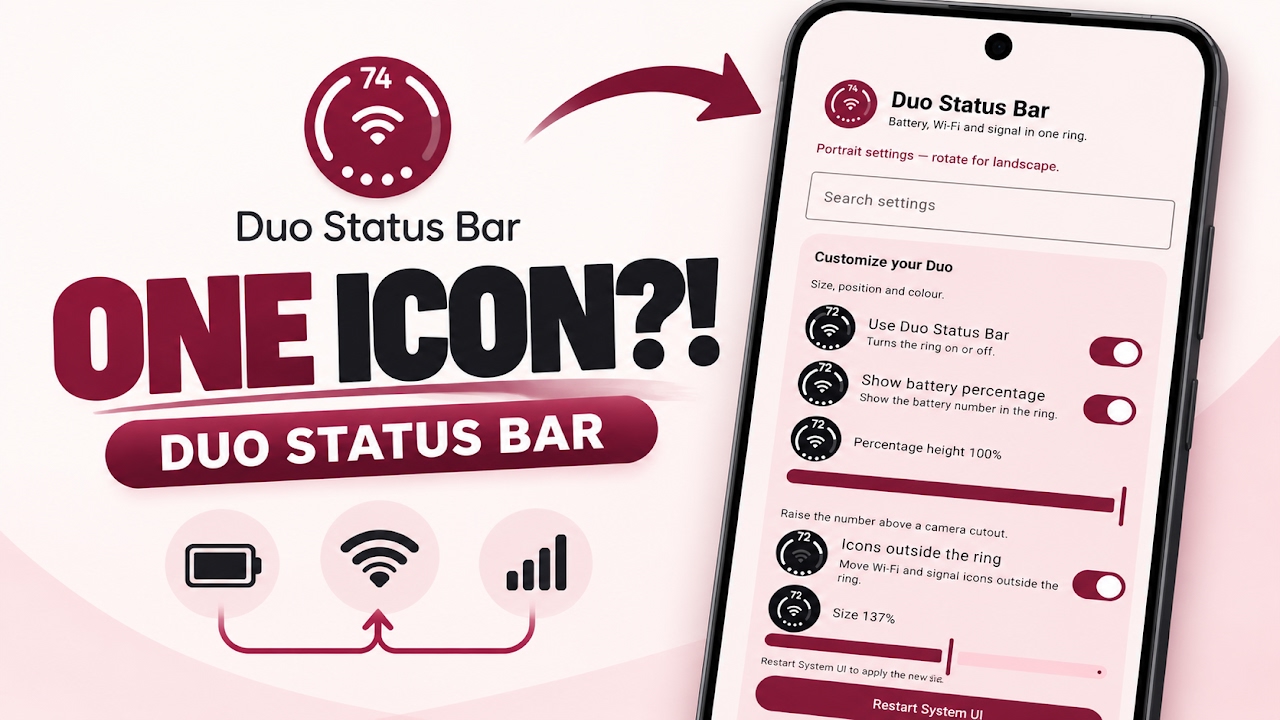
For years, Android enthusiasts have sought ways to personalize every single aspect of their device's user interface. One area that often becomes overwhelmingly cluttered is the status bar located at the top of the screen. As smartphones integrate more features, the status bar quickly fills up with various indicators for battery life, Wi-Fi strength, cellular signal, Bluetooth connection, and multiple app notifications. This constant influx of icons can detract from the overall aesthetic of a carefully curated home screen setup. Customization tools have evolved to address this, moving away from complex custom ROM installations toward more modular, systemless modifications. The Duo Status Bar is a prime example of this modern approach, offering a highly refined, minimalist solution for users who want to clean up their top display area without losing critical system information.
Understanding the Duo Status Bar Concept
The Duo Status Bar is an incredibly innovative customization modification designed specifically to tackle interface clutter. Instead of merely hiding icons, it completely replaces the standard battery, Wi-Fi, and mobile signal indicators with a single, perfectly clean, and fully animated unified indicator. This minimalist approach drastically reduces the visual noise at the top of the display, resulting in a sleek and modern look that complements custom wallpapers and minimal icon packs. Because this modification is built as an LSPosed module, it operates on a systemless level. This means it interacts with the Android framework to alter the visual presentation without permanently modifying the core system partitions, ensuring a safer customization experience for advanced users.
Installation Prerequisites and Initial Setup
Before diving into the setup process, users must ensure their device meets the necessary requirements. Since this tool operates as an LSPosed module, the device must have a compatible root solution installed, along with the LSPosed framework itself actively running in the background. To get started, the installation package must be acquired directly from the official developer repository. Once the application package is downloaded to the device, users can navigate to their designated downloads folder using any standard file manager. Tapping the application file will initiate the standard Android installation process. After the initial installation finishes unpacking, the application cannot be launched normally right away. Users must first open their LSPosed manager application, navigate to the modules section, locate the newly installed customization app, and toggle the switch to enable it. Opening the application after enabling the module will immediately prompt a system UI restart, which requires granting superuser permissions to apply the initial graphical hooks.
Video Link:
Exploring Battery Configuration and Positioning
Once the system UI has successfully restarted, users can begin exploring the extensive configuration options available within the application interface. The first major section is dedicated to battery icon management. Users have granular control over how battery information is displayed, including the option to show or completely hide the numerical battery percentage depending on their preference for minimalism. Furthermore, the application allows for precise adjustments to the overall size of the indicator and its exact positioning on the screen. It is important to note that any modifications made to the physical size or structural position of the indicator will require another quick restart of the system UI. The developers have conveniently included a built-in restart button within the application to make this process seamless.
Advanced Animations and Visual Appearance Settings
Beyond basic positioning, the module offers a dedicated animations menu. Here, users can individually toggle the charging animations and signal fluctuation animations on or off. For those who prefer a specific visual pacing, the exact speed of these animations can be precisely adjusted to match the user's liking. Moving over to the appearance tab unlocks even deeper aesthetic control. Users can manually dictate the exact color of the icon to match their current system theme, enable smooth graphics rendering for high refresh rate displays, and select the perfect clock font to complement the overall design language. The appearance settings also provide the ability to customize exactly what specific information or icon is displayed right in the center of the unified indicator.
Status Bar Icon Management and Gesture Integration
To achieve the maximum level of cleanliness, users must configure how the new module interacts with the pre-existing system icons. Under the status bar icons settings, there is a choice to either keep the standard legacy icons visible beside the new unified indicator or to completely hide them. Hiding the native icons is highly recommended to fully realize the minimalist vision of this modification. Additionally, for users who rely on screen gestures, the tap actions for this status bar are fully integrated with the Auto Expand module, allowing for optional interactive gestures. Finally, an included about section provides real-time module status tracking and an easy way to send bug reports directly to the developer.
System Safety and Non-Destructive Modding
Perhaps the most significant advantage of utilizing this specific module is its absolute commitment to system integrity. The modification absolutely never touches, overwrites, or modifies any core Android system files. Its operation is entirely surface-level; it merely hides the native system icons from view and draws the newly generated, animated indicator directly over that space. This non-destructive methodology means that users have an immediate, failsafe retreat. If a user decides they no longer want the minimalist look, they can simply disable the module within the LSPosed manager at any given time. Upon disabling it, the original, standard system icons will instantly return to the status bar exactly as they were before, with zero risk of a bootloop or permanent visual glitches.
Final Verdict
The Duo Status Bar is a masterclass in focused, effective Android customization. By leveraging the power of the LSPosed framework, it delivers a striking visual upgrade that drastically modernizes the user interface without compromising system stability. It is an essential tool for anyone obsessed with creating a perfectly clean, minimalist home screen setup.
Download
https://devuploads.com/5g9izakflulo
Credits

Discussion (0)
Post a Comment
No comments yet. Be the first to share your thoughts!