
Android has no shortage of useful applications, but finding genuinely interesting open-source projects can sometimes take more effort than it should. New projects appear on GitHub every day, developers continue experimenting with better privacy and networking tools, and useful utilities can easily get buried among thousands of repositories.
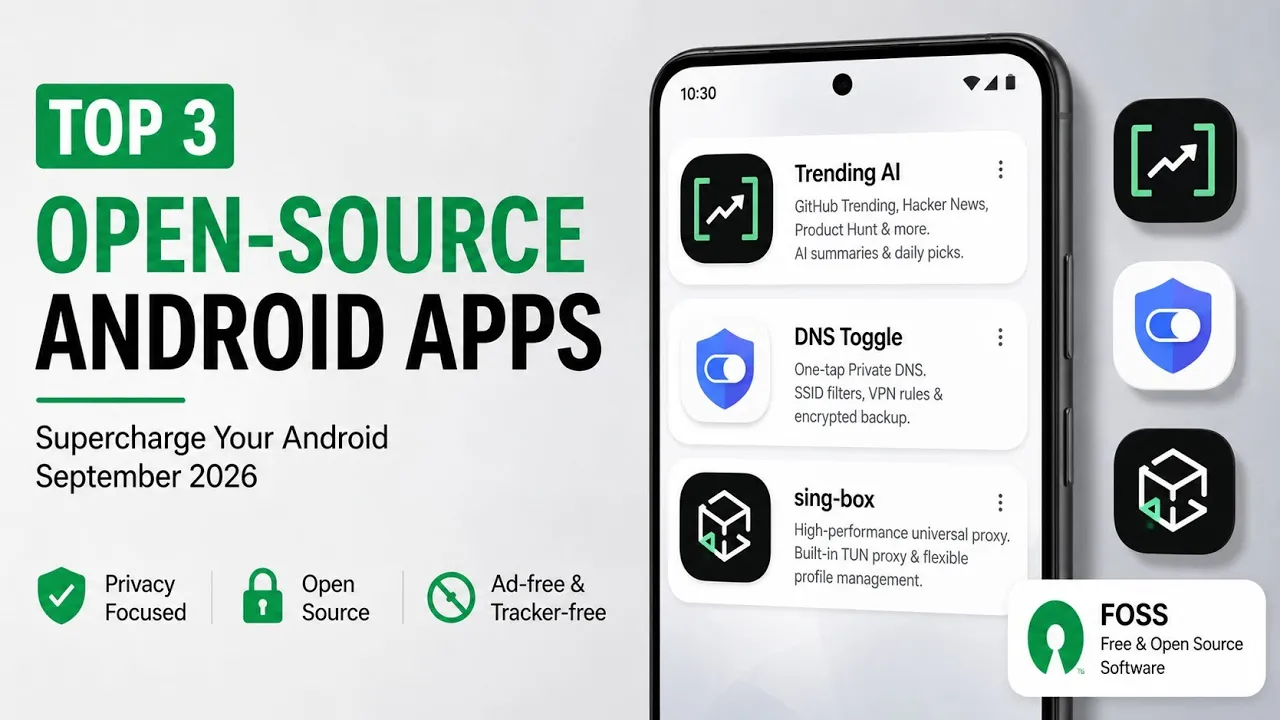
So, instead of scrolling through endless lists, this article highlights three open-source Android applications featured in the video: Trending AI, DNS Toggle and sing-box.
They each solve a very different problem.
Trending AI focuses on discovering interesting software and technology projects, DNS Toggle makes Android’s Private DNS setting easier to manage, while sing-box is designed for users who need more advanced proxy and network-routing capabilities.
1. Trending AI — Discover What’s Happening in Open Source
The first application is Trending AI, also referred to in the video as GitHub Trending and Hacker News.
If you regularly follow open-source development, you probably know how difficult it can be to keep up with everything happening across GitHub, Hacker News and other technology communities.
Trending AI brings several of those discovery sources together in one place.
The application aggregates GitHub Trending repositories, Hacker News discussions and Product Hunt launches, creating a single feed for discovering projects and technology products that are currently attracting attention.
That alone is useful, but the application goes a step further by adding AI-generated summaries.
Instead of opening every repository or article individually, you can use the summaries to get a quick understanding of what a project does, its main features and why it might be interesting.
This can be especially helpful when you’re browsing unfamiliar repositories and simply want to decide whether something deserves a closer look.
AI Summaries and Historical Trends
One of the more interesting features is the ability to browse historical archives.
Rather than seeing only what’s trending today, you can go back to previous dates and explore projects that were popular at that point in time.
The application also includes daily AI-curated selections highlighting notable releases and discoveries.
The interface follows Material 3 design principles and supports both light and dark themes. It also includes English and Simplified Chinese language support.
Another useful feature is the Share to AI option, which lets you send repository information to your preferred AI assistant for further analysis.
For developers and technology enthusiasts, that can make discovering new projects considerably more convenient.
Credit: HarlonWang/TrendingAI on GitHub
2. DNS Toggle — Quick Control Over Android Private DNS
The second application is much more focused.
DNS Toggle is designed for people who frequently change Android’s Private DNS configuration.
Normally, changing Private DNS requires opening Android’s network settings and navigating through several menus. That’s not particularly difficult, but it becomes annoying if you need to switch DNS providers regularly.
DNS Toggle turns Private DNS into a Quick Settings tile, allowing you to change the configuration directly from Android’s notification shade.
You can configure multiple DNS hostnames and switch between them without repeatedly digging through the system settings.
For example, you might have different DNS configurations for different networks or use a provider such as NextDNS or Cloudflare.
Automatic Wi-Fi Rules
The application becomes more interesting when automation is involved.
DNS Toggle can create Wi-Fi-based rules that automatically disable Private DNS on selected networks.
This can be useful when a particular Wi-Fi network requires local DNS resolution or when Private DNS interferes with a captive portal or network login process.
The script also describes automatic connectivity detection and the ability to blacklist problematic Wi-Fi SSIDs.
That means you don’t necessarily have to remember which networks require special treatment.
VPN Override
DNS Toggle also includes a VPN Override mode.
This allows the application to either enforce a selected DNS profile or step aside when a VPN connection becomes active.
There are several smaller quality-of-life features as well.
You can rename the Quick Settings tile, back up and restore configuration using password-protected encryption, and even hide the launcher icon so the application can be operated primarily through the notification shade.
According to the supplied script, the application doesn’t include advertisements or tracking and only requests local Wi-Fi scan permission for reading SSID names.
For users who regularly experiment with DNS providers, those options make DNS Toggle a surprisingly practical utility.
Credit: ELowry/DNSToggle on GitHub
3. sing-box — Advanced Proxy and Network Routing
The third application is sing-box, and it’s aimed at a very different audience.
While DNS Toggle focuses on making one Android networking setting easier to control, sing-box is designed as a much more capable proxy client and network-routing platform.
It uses Android’s VPN service to establish a TUN interface, allowing network traffic to be processed according to the configured routing rules.
This gives advanced users significantly more control over how traffic is handled.
Multiple Profiles
One of the convenient aspects of sing-box is its profile management.
You can import and manage multiple local or remote configurations and switch between them when required.
That can be useful if you maintain different configurations for different networks or purposes.
The application can also be used for custom DNS rules, traffic routing and per-application network handling.
For users who understand proxy configurations and network routing, this provides considerably more flexibility than a basic VPN application.
Who Is sing-box For?
sing-box isn’t really designed for someone looking for a one-button VPN.
Its flexibility comes with additional complexity.
You need to understand the configuration you’re importing and what the associated routing rules actually do.
For experienced users, however, that flexibility is exactly what makes it attractive.
The project supports a range of modern networking configurations and can act as a central platform for managing different proxy and routing profiles.
The script also highlights its focus on performance and relatively low battery impact.
Credit: SagerNet/sing-box on GitHub
Watch the Video
Which One Should You Try?
That really depends on what you want from your Android phone.
If you’re interested in discovering new open-source projects and technology trends, Trending AI is the obvious choice.
If you frequently change Private DNS settings or want automated DNS behaviour depending on the Wi-Fi network you’re connected to, DNS Toggle is probably the most useful.
And if you need advanced proxy management and network routing, sing-box offers considerably more control.
The three applications don’t really compete with each other. In fact, they complement completely different use cases.
A Few Things to Keep in Mind
Open-source doesn’t automatically mean that an application is suitable for everyone.
With networking applications in particular, it’s important to understand what you’re configuring.
If you’re importing a proxy or routing profile into sing-box, make sure you trust the source of that configuration and understand where your traffic is being routed.
Similarly, DNS settings affect how domain names are resolved on your device, so choose DNS providers and configurations carefully.
For Trending AI, remember that an AI-generated summary is intended to help you understand a project quickly. If a repository looks interesting or you’re considering using its software, it’s still worth visiting the original project and reading its documentation.
Final Thoughts
These three applications demonstrate just how varied the open-source Android ecosystem has become.
Trending AI makes it easier to discover projects across GitHub, Hacker News and Product Hunt, while its AI summaries and historical archives provide additional context.
DNS Toggle takes an Android setting that normally requires several taps and turns it into a much more accessible Quick Settings control, with automation and VPN-related options for more advanced use cases.
And sing-box goes much deeper into networking, providing profile management, proxy functionality, TUN-based routing and configurable traffic handling.
None of these applications is necessarily something every Android user needs.
But if you’re interested in open-source software, privacy-conscious tools, networking or simply finding useful projects outside the usual Play Store recommendations, they’re worth exploring.
Discussion (0)
Post a Comment
No comments yet. Be the first to share your thoughts!