
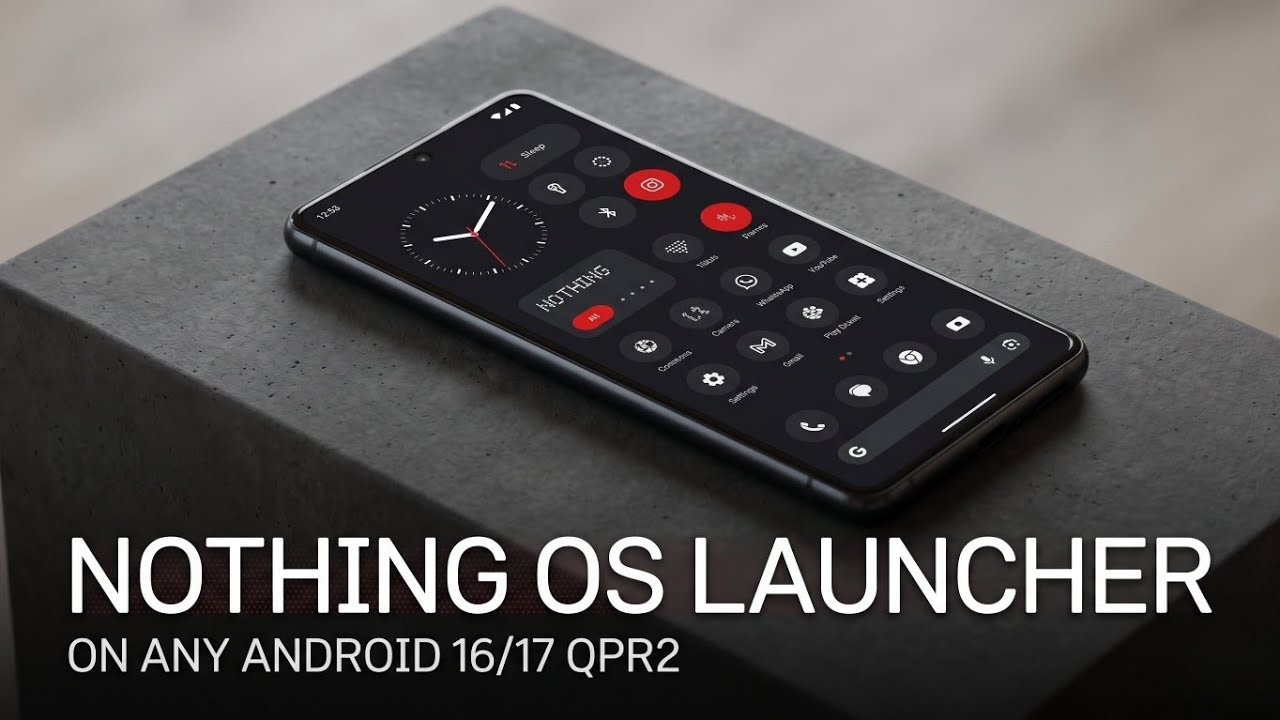
The minimalist aesthetic of Nothing OS has captivated many Android enthusiasts. Its distinct dot-matrix typography, monochrome icon packs, and highly functional custom widgets offer a refreshing break from cluttered stock interfaces. If you want to experience this unique look without buying new hardware, a powerful new Magisk module makes it possible to completely replace your stock launcher with the Nothing OS interface.
This guide provides everything you need to know about porting the Nothing OS Android 16 Launcher to your device, including its top features, known bugs, a step-by-step installation walkthrough, and real-world testing results across different Android builds.
Key Features & Enhancements
This port isn't just a basic visual skin; it is a feature-rich launcher built directly from the latest Nothing OS Android 16 QPR2 base. The developers have optimized performance and fixed major core bugs to ensure a seamless experience.
- Fixed Gesture Navigation: Previous ports often suffered from broken system gestures, causing lag or crashes when swiping home or opening recent apps. This release completely resolves the gesture issue specifically for Android 16 QPR2.
- Wallpapers & Advanced Styles: Unlock the full customization engine of Nothing OS. Access premium, clean wallpapers alongside advanced styling options to modify app grids and accent colors.
- Upgraded Widgets & Enhanced Connectivity: Enjoy the signature Nothing OS widgets (including the analog clock, quick toggles, and system monitors) featuring stable system connectivity for real-time updates.
- New Nothing Widgets: This version introduces several newly backported widgets straight from the latest Nothing OS builds to offer even more home screen customization layout options.
- Weather Quick Look Fix: The persistent bug causing weather data to freeze or fail to display in the Quick Look widget has been completely patched.
- Double Tap to Sleep: Seamlessly lock your device by double-tapping an empty space on the home screen. (Note: If this feature fails to trigger initially, grant root permissions directly to the Nothing Launcher application).
Watch the full tutorial here on my Youtube channel:
Known Bugs & Limitations
While this module serves as an excellent daily driver, it is important to be aware of a few minor bugs before flashing it to your primary system:
- "Clear All" Button Bug: On a very small number of devices, the "Clear All" button in the recent apps overview screen may fail to register inputs.
- Circle to Search Incompatibility: The Google Circle to Search feature does not currently work when this custom launcher is active.
- Community Bug Reporting: If you encounter unique device-specific bugs, the developers encourage users to report them so they can be addressed in future update packages.
Step-by-Step Installation Guide
Before starting, ensure your device is rooted with Magisk and that you have downloaded the correct Nothing OS Launcher Magisk module zip file to your local internal storage.
Step 1: Locate the Zip File
Open your preferred Android File Manager app and navigate to your Downloads directory. Locate the downloaded Nothing OS Launcher Magisk module zip file and verify that the file download completed successfully without corruption.
Step 2: Flash the Module in Magisk Manager
- Launch the Magisk Manager app on your rooted Android device.
- Navigate to the Modules tab located at the bottom right corner of the interface.
- Tap the Install from storage button at the top.
- Browse your internal storage and select the Nothing OS Launcher zip file.
- Magisk will open a terminal interface and flash the required files automatically. Wait for the process to display a "Success" or "Done" message.
Step 3: Reboot the Device
Once the flashing process finishes, tap the blue Reboot button at the bottom right corner of the screen to apply the changes to your system.
Real-World Compatibility Warnings (Important Testing Notes)
Testing custom Magisk modules across various custom ROMs and Android versions can sometimes yield unpredictable results. During an extensive test deployment, two critical scenarios emerged that every user should keep in mind before flashing:
1. Axion OS Bootloop Risk
When attempting to install this module on a device running Axion OS, the system unfortunately encountered a critical conflict, resulting in a persistent bootloop immediately following the device restart. If you are running Axion OS or a similarly configured custom ROM, it is highly recommended to have a custom recovery (like TWRP or OrangeFox) installed so you can easily uninstall or disable the module via the file manager if a bootloop occurs.
2. Android 17 Testing (Google Pixel 6)
To further explore cross-compatibility, the exact same module zip file was tested on a Google Pixel 6 running an early build of Android 17.
The results were unique: the module successfully flashed within Magisk Manager without any terminal errors, and the phone rebooted flawlessly without experiencing a bootloop. However, despite Magisk listing the module as active, it functioned as a "ghost module."
None of the actual application files such as the Nothing Launcher itself, the wallpapers app, or the custom widgets framework APKs were pushed into the correct system app directories. The device interface remained entirely stock. If you plan to test this on newer software variants like Android 17, you will likely need to manually extract and sideload the APK files contained within the module zip to get the launcher to display in your app drawer.
Conclusion
The Nothing OS Android 16 Launcher Magisk module is a phenomenal tool for anyone running an Android 16 QPR2 device who wants to break away from standard stock designs. It delivers a fast, gesture friendly, and deeply customizable workspace that closely mimics authentic hardware. Just keep a backup ready if you are using specific custom ROMs like Axion OS, and enjoy your fresh, minimalist setup!
Subscribe to my Youtube channel for daily android tips tricks and tutorials: TechyNoob
Discussion (0)
Post a Comment
No comments yet. Be the first to share your thoughts!