Revamping the Android Startup Sequence
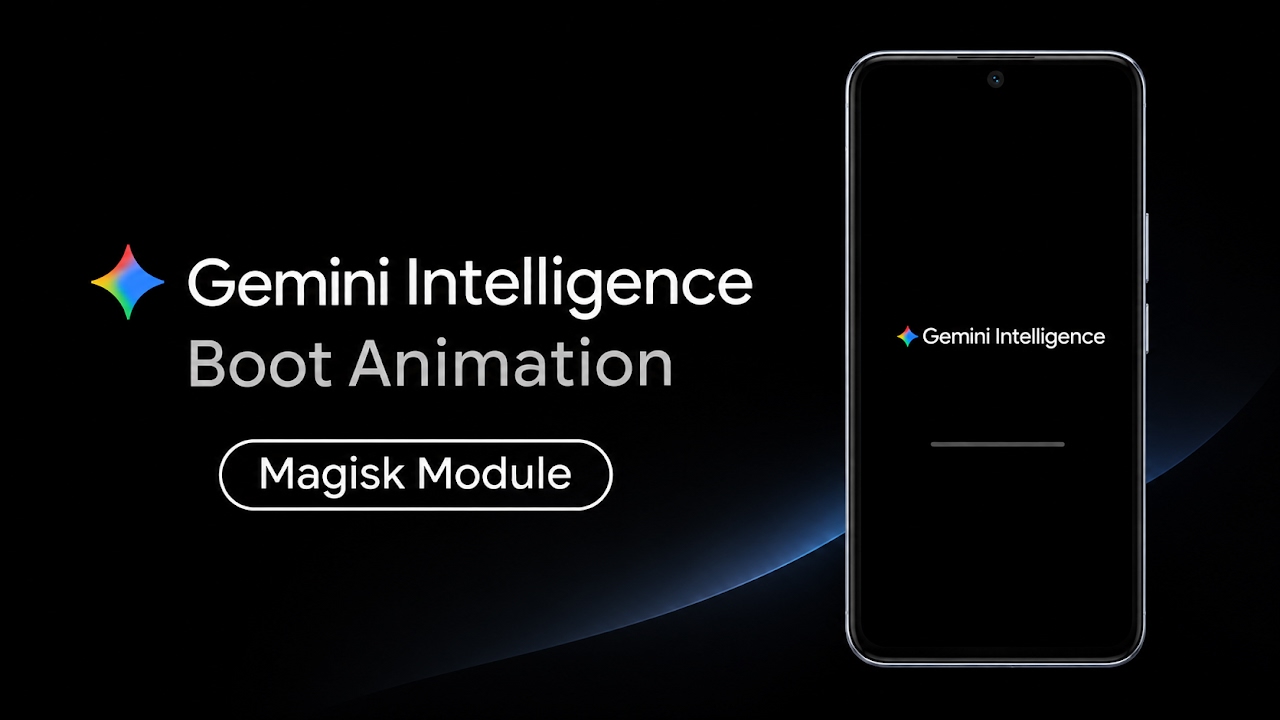
When modifying and personalizing an Android smartphone, the vast majority of users immediately focus their attention on the home screen layout, custom icon packs, and dynamic wallpapers. However, one of the most frequently overlooked aspects of the user interface is the device startup sequence. Every time a smartphone is powered on or restarted, the user is forced to stare at the manufacturer's default boot animation for several seconds while the operating system compiles its necessary background services. These default startup screens are often incredibly boring, overly corporate, or cluttered with carrier branding that detracts from the premium feel of the hardware. For enthusiasts who have already taken the step to gain root access to their device, this presents a perfect opportunity for deep system customization. By completely replacing that stagnant default screen with a brand new, highly sophisticated Gemini intelligent boot animation, users can immediately inject a futuristic and fresh aesthetic into their device from the exact moment they press the power button.
The Power of Systemless Magisk Modules
In the early days of Android modification, altering the startup sequence was a relatively risky procedure. Users had to manually navigate to the root directory using specialized file managers and physically overwrite the core system media files. If the replacement file was corrupted or improperly formatted, it could easily cause severe bootloop issues that required a total device wipe to resolve. Fortunately, modern customization relies entirely on the Magisk framework, which is strictly required to apply this specific Gemini boot animation. Magisk operates on a systemless level, meaning it intelligently intercepts the boot process and temporarily mounts the new animation over the original one without ever permanently modifying or deleting the underlying system partitions. This architecture ensures maximum safety; if the user ever decides they want to revert back to their original factory startup screen, they simply need to disable or uninstall the module within the application, and the original manufacturer logo will seamlessly return upon the next reboot.
Acquiring the Required Modification Files
To initiate this visual transformation, the user must first acquire the correct installation package. The developer has packaged the entire animation sequence into a standardized Magisk flashable zip archive. This specific file must be downloaded directly to the internal storage of the Android device. Utilizing any standard file manager application, users can easily navigate to their designated downloads folder to verify that the file has been successfully transferred and is completely intact. One of the most impressive aspects of this specific modification is how meticulously optimized the underlying code is. The zip archive is incredibly lightweight, meaning it will download almost instantaneously on a standard network connection. Despite its small physical file size, it contains all the necessary high-quality, high-resolution assets required to completely transform the startup experience, ensuring that it does not take up any unnecessary storage space on the smartphone's internal drive.
Video Demonstration
Executing the Installation via Magisk Manager
With the lightweight zip file securely saved within the local storage directory, the next step involves the actual flashing procedure. Users must open the Magisk Manager application directly from their app drawer. Once the dashboard loads, navigate to the dedicated modules section, which is typically accessed via the puzzle piece icon located at the bottom right corner of the user interface. From this menu, users must tap on the 'install from storage' option located prominently at the top of the screen. This action will open the Android system file picker. Navigate back to the downloads folder and carefully select the Gemini boot animation zip file. The Magisk framework will immediately take over, running the internal installation script and flashing the assets directly into the systemless environment. The entire flashing process is highly automated and completes entirely in just a few brief seconds. Once the terminal output at the bottom of the screen indicates that the process has finished successfully, the user must tap the reboot button to apply the system-wide changes.
Visual Experience and the Gemini Aesthetic
As the smartphone restarts, the initial hardware splash screen—which is permanently coded into the bootloader—will appear for just a few seconds. Immediately following this brief hardware check, the true magic of the modification reveals itself. Instead of the mundane manufacturer logo, the brand new Gemini intelligent boot animation takes over the display. The visual presentation is absolutely stunning, characterized by incredibly smooth, fluid transitions that give the device an overwhelmingly modern and highly sophisticated aesthetic. The animation sequences are exceptionally vibrant, utilizing deep color saturation and perfectly centered graphical elements that completely change the overarching vibe of powering on the device. It successfully captures the cutting-edge essence of modern artificial intelligence branding, making the smartphone feel significantly more premium and customized.
Resolution Scaling and Module Verification
A common issue with aftermarket boot animations is poor resolution scaling, where the graphics appear stretched, pixelated, or off-center on devices with varying screen dimensions. The developer behind this Gemini module has specifically engineered the assets to be dynamically resizable, ensuring it scales beautifully across the vast majority of modern high-definition smartphone displays. However, the developer has explicitly noted a request for community testing from users operating older devices with 720p resolution displays to absolutely guarantee perfect alignment on lower pixel density screens. After the device has fully booted to the main home screen, it is good practice to open the Magisk Manager application one final time and review the active modules list. Checking this list ensures that the Gemini Intelligence Bootanimation module is successfully installed, enabled, and actively running without any system conflicts.
Final Verdict
Replacing the default startup screen is a remarkably simple process that yields a massive visual upgrade for any rooted Android device. The Gemini intelligent boot animation module delivers a flawless, high-quality aesthetic transformation that makes older hardware feel distinctly modern and futuristic. By leveraging the absolute safety and convenience of the systemless Magisk framework, power users can effortlessly personalize one of the most rigid aspects of the operating system without risking their device's stability. It is a highly recommended modification for anyone looking to perfect their custom Android setup.
Discussion (0)
Post a Comment
No comments yet. Be the first to share your thoughts!