
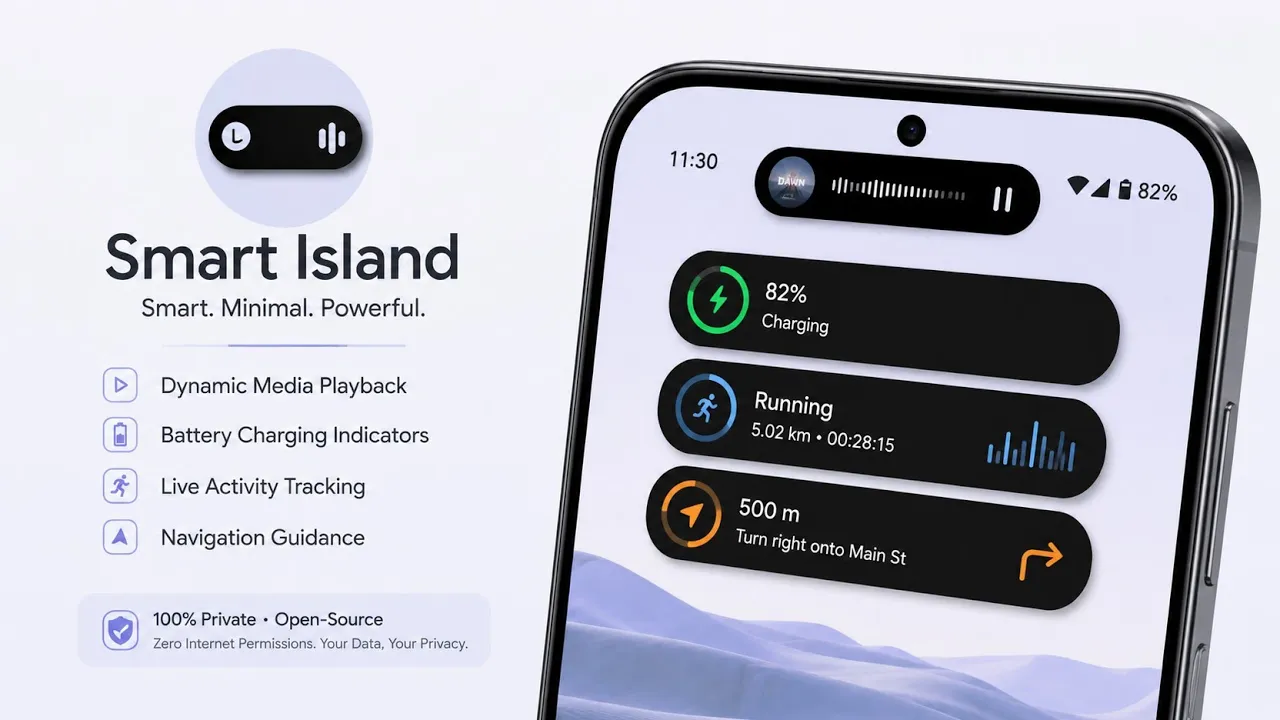
Apple's Dynamic Island has become one of the most recognizable interface features on recent iPhones. Android users have had similar customization options for years, but most solutions rely on overlays, notification access, or additional background services.
Smart Island is an open-source Android application that brings a similar notification and floating-island experience to Android phones. Instead of replacing the entire system interface, it uses Android's notification and overlay capabilities to display useful information around the front-camera area or another selected location on the screen.
What makes Smart Island particularly interesting is its focus on local processing and open-source development. The project is designed to provide the functionality without depending on a cloud service for processing notifications.
I tested Smart Island on my Redmi Note 7 Pro running MatrixxOS based on Android 16 QPR2. In this article, I'll explain what Smart Island does, how it works, how to set it up, and some of the practical limitations you should understand before using an overlay-based customization app.
What Is Smart Island?
Smart Island is an Android customization application inspired by the Dynamic Island interface found on newer iPhones.
The application can display information such as notifications and other supported system events through a floating interface. Instead of requiring a specially modified Android framework, Smart Island works as an application using Android's available notification and overlay functionality.
The project's source code is publicly available, allowing users and developers to inspect how the application works and contribute to its development.
This approach makes Smart Island different from a system modification or root module. You don't need to flash a custom ZIP or modify the Android system partition simply to experiment with the interface.
My Testing Setup
For this test, I used:
- Device: Redmi Note 7 Pro
- ROM: MatrixxOS
- Android: Android 16 QPR2
- Root: Not required for the basic application
- Use case: Notification and Dynamic Island-style customization
Because the Redmi Note 7 Pro has a physical display notch rather than the pill-shaped camera cutout found on many newer phones, it is also a useful example of how an overlay-based Dynamic Island implementation behaves on a different display design.
Watch the Video
I also created a complete video demonstration showing Smart Island and how it can be configured on an Android phone.
If you prefer a visual demonstration, I recommend watching the video first and then using this article as a reference for the setup, features and limitations.
How Does Smart Island Work?
Smart Island primarily relies on Android's existing notification and overlay capabilities.
When an application receives a notification, Smart Island can use that information to present a customized visual interface on top of the existing Android interface. The overlay can then be positioned and configured according to the supported settings.
This is fundamentally different from modifying the Android SystemUI itself.
That distinction is important because an overlay application can generally be removed without reverting a system modification. On the other hand, the application needs the appropriate Android permissions to display information over other applications and access notifications.
Users should therefore review the permissions requested during setup and only enable the capabilities they are comfortable granting.
Setting Up Smart Island
The first step is to install the application and open it.
Depending on the features you want to use, Android may ask you to grant notification access or permission to display overlays over other applications.
These permissions are important to the way the application operates. Notification access allows the application to respond to supported notification events, while overlay permission allows the Smart Island interface to appear above other applications.
After granting the required permissions, open the application's settings and configure the appearance and behaviour according to your preference.
You can download the version used for this video here:
For the source code and project information, visit the official Smart Island GitHub repository.
What Makes It Useful?
The biggest attraction is obviously the visual change.
Instead of receiving notifications only through Android's conventional notification shade, users can have supported information presented in a more compact floating interface.
This can make certain events easier to notice without opening the notification panel.
The open-source nature of the project is another advantage. Developers and technically inclined users can inspect the source rather than relying entirely on a closed application whose implementation cannot be independently examined.
The project's GitHub repository also provides documentation and development information for people interested in understanding or contributing to the application.
Important Limitations
Smart Island is an overlay-based customization, so it isn't equivalent to Apple's Dynamic Island or a modification built directly into Android's SystemUI.
The visual experience can therefore vary depending on the phone's screen dimensions, camera/notch position, display density, Android version and the behaviour of other applications.
On a phone with a different notch or camera-hole arrangement, you may need to adjust the position and size of the interface.
Another consideration is that Android aggressively manages background applications on some devices. Manufacturer-specific battery optimization can sometimes affect applications that need to remain active in the background.
If the overlay stops appearing unexpectedly, check the application's battery-optimization settings and Android's background restrictions before assuming that the application itself is broken.
Notification Access and Privacy
Smart Island may require access to notifications to provide its functionality.
That permission deserves attention because notifications can contain private information such as messages, verification codes, email previews and other personal data.
Before granting notification access, understand what the permission means and only install applications from sources you trust.
One advantage of using an open-source project is that its implementation can be inspected by developers who are comfortable reviewing source code. However, open source should not automatically be interpreted as a guarantee that an application is completely risk-free.
You should still keep the application updated and review its permissions.
Does It Require Root?
No traditional root setup is required for the basic Smart Island experience.
This is useful for users who don't want to unlock their bootloader or install Magisk simply to change the appearance of notifications.
That also makes it accessible to a much wider range of Android devices.
However, not requiring root doesn't mean that the application has unlimited access to Android. It still operates within the permissions and restrictions imposed by the Android operating system.
My Experience on Android 16
Testing Smart Island on the Redmi Note 7 Pro with MatrixxOS and Android 16 QPR2 was particularly interesting because this isn't a phone designed around a Dynamic Island-style interface.
The application demonstrates how much of the experience can be recreated at the application level without modifying SystemUI.
At the same time, the differences between an overlay implementation and a native interface become apparent. The final appearance depends heavily on the phone's display and Android configuration, so users should expect to spend some time adjusting the settings for the best result.
Pros and Cons
Pros
- Open-source project
- Dynamic Island-inspired interface
- Doesn't require traditional root
- Uses Android's existing notification functionality
- Can work on older Android hardware
- Customizable overlay experience
Cons
- Requires notification/overlay permissions for relevant features
- Appearance depends on the device's display
- Background restrictions can affect behaviour
- Not the same as a native SystemUI implementation
- Compatibility can vary between Android devices
Final Verdict
Smart Island is an interesting Android customization project for anyone who wants to experiment with a Dynamic Island-style interface without modifying the Android framework.
I particularly like the fact that it takes an application-level approach. You don't need to flash a modification or root the phone simply to experiment with the concept.
On my Redmi Note 7 Pro running MatrixxOS based on Android 16 QPR2, it also demonstrates that this type of interface can be recreated on hardware that was never designed around Apple's Dynamic Island concept.
However, expectations should remain realistic. Smart Island is an Android overlay application, not a native replacement for Android's SystemUI. Its appearance, notification behaviour and background reliability can therefore vary between devices.
If you enjoy Android customization and want an open-source Dynamic Island-inspired experience, Smart Island is worth checking out. Just make sure you understand the notification and overlay permissions before enabling them.
Official Developer: agu pta07505
Source: Smart Island GitHub
Test Device: Redmi Note 7 Pro
ROM: MatrixxOS
Android: 16 QPR2
Discussion (0)
Post a Comment
No comments yet. Be the first to share your thoughts!