
Shizuku has become one of the most useful tools for Android users who want to access advanced system functionality without rooting their phones. However, as Android continues to evolve, compatibility with newer Android versions can become a challenge for projects that depend on system and hidden APIs.
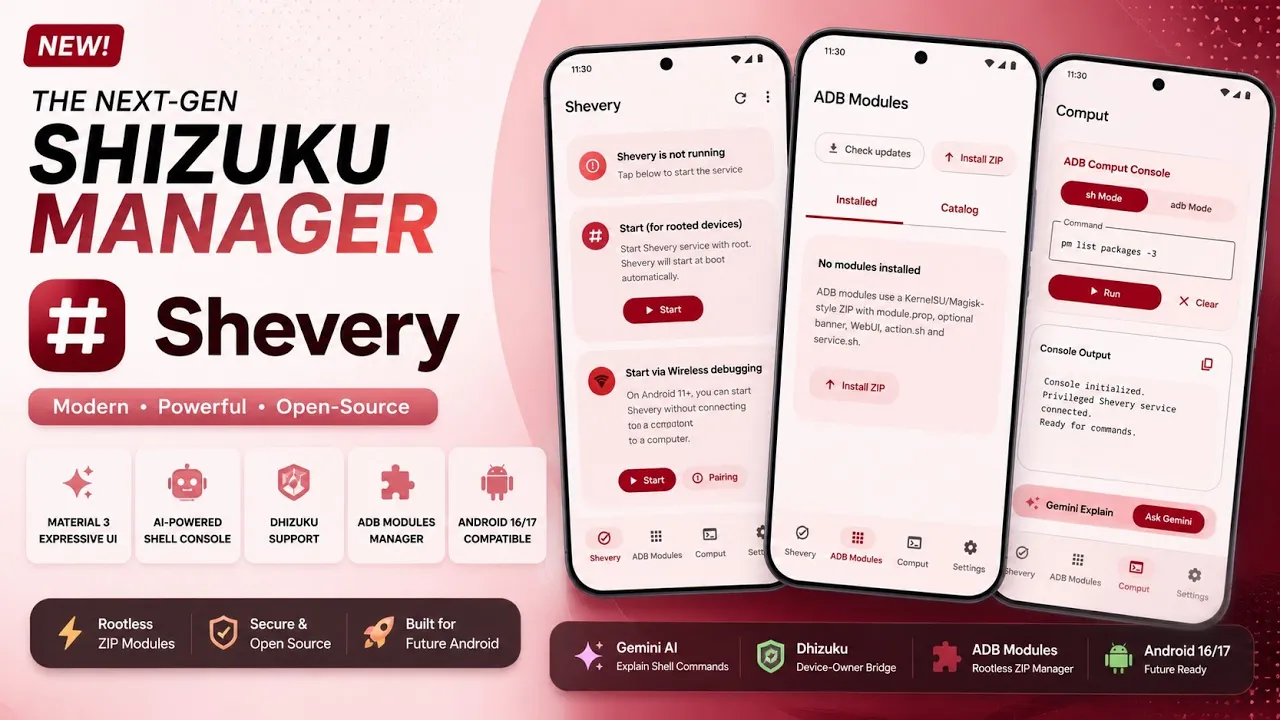
Shevery is a modernized fork of Shizuku that aims to address some of these compatibility and usability concerns while adding several additional features. Its developer describes it as a modern Android manager built with Jetpack Compose and Material 3, with ongoing Android 16 and Android 17 compatibility work.
I tested Shevery on my Redmi Note 7 Pro running MatrixxOS, based on Android 16 QPR2. In this article, I’ll explain what Shevery is, how it differs from the traditional Shizuku experience, what features it adds, and what you should know before replacing an existing Shizuku installation.
What Is Shevery?
Shevery is a fork of the Shizuku project rather than an entirely unrelated Android utility. It retains the basic idea behind Shizuku: allowing compatible applications to communicate with Android’s system services through a privileged service running using ADB or root.
The developer has modernized the manager interface using Jetpack Compose and Material 3, while also adding features such as an ADB Modules manager, a module catalog, improved shell/ADB functionality, experimental Dhizuku support, and work aimed at Android 16 and Android 17 compatibility.
This makes Shevery interesting for users who already rely on Shizuku-based applications and want a more feature-rich manager.
It is important to understand that Shevery does not magically give every Android application unrestricted root access. The permissions available to applications still depend on whether Shevery/Shizuku is running through ADB or root and what Android allows in that environment.
My Testing Setup
For this article and the accompanying video, I used:
- Device: Redmi Note 7 Pro
- ROM: MatrixxOS
- Android: Android 16 QPR2
- Root: Not required for the ADB-based setup
- Purpose: Testing Shevery’s Shizuku functionality and interface
Using an older smartphone with a modern Android 16-based custom ROM also makes this setup useful for demonstrating how these tools can extend the functionality of hardware that is no longer receiving current Android versions from its original manufacturer.
Watch the Shevery Video
I’ve also covered the installation and practical use of Shevery in a dedicated video. If you prefer seeing the interface and setup process before installing it, the video provides a visual walkthrough.
The written guide below provides additional context, particularly around compatibility, modules and the differences between Shevery and the original Shizuku project.
Why Would You Use Shevery?
The main reason to consider Shevery is its combination of the familiar Shizuku architecture with additional features and ongoing compatibility work.
The official repository specifically lists Android 16/17 target work, an ADB Modules screen, module management, a module catalog, improved shell/ADB functionality and experimental Dhizuku support.
For someone who already uses Shizuku-compatible applications, the module management functionality can be particularly interesting.
Instead of treating every shell-based modification as a separate command that needs to be executed manually, Shevery provides an interface for managing supported ZIP-based ADB modules.
According to its documentation, these modules can contain files such as module.prop, action.sh, optional service scripts and local WebUI components. Shevery validates the package structure and applies limits to things such as extracted size, script output and execution time.
ADB Modules Without Traditional Root Modules
One important distinction is that Shevery’s ADB Modules system is not the same thing as Magisk modules.
The official documentation describes them as ZIP packages installed into Shevery’s private application storage and executed through the active Shizuku server. When Shizuku is running through ADB, the scripts receive ADB shell privileges; when it is running through root, they can operate with root privileges.
The documentation also makes it clear that these modules don’t provide the same mount-based system as traditional root modules. There is no /data/adb/modules compatibility promise and no equivalent long-running daemon supervisor at this stage.
This distinction is important because someone moving from Magisk should not assume that every existing Magisk module will work inside Shevery.
Installing Shevery
Before installing Shevery, there is an important migration consideration.
The developer states that the application ID has changed from the original Shizuku manager’s package name to Shevery’s package name. Because of this, users are instructed to uninstall the older official Shizuku Manager before installing Shevery, otherwise the two applications can conflict.
After installing the application, you need to configure its service. The exact process depends on whether you want to use ADB or root mode.
For an unrooted phone, the ADB/wireless-debugging route is the relevant option. Users should follow the current setup instructions provided by the project rather than relying on an old Shizuku tutorial, because Android’s debugging and permission behaviour changes between releases.
You can download the version used for this video here:
For the source code and latest releases, visit the official Shevery GitHub repository.
Shevery also credits the original Shizuku project for its API and core sources.
Android 16 and Android 17 Compatibility
Compatibility is one of the most interesting reasons this fork exists.
The Shevery project documents changes made in Android 17 that affected hidden API signatures used by Shizuku. According to its compatibility documentation, Android 17 introduced changes to APIs including IPermissionManager and IPackageManager, which could cause the older implementation to fail during permission-related operations.
Shevery’s developers implemented a compatibility mechanism intended to handle these API changes dynamically.
This doesn’t mean that every Android 16 or Android 17 device is guaranteed to work perfectly. Android builds, manufacturer software and custom ROM implementations can behave differently, so compatibility should always be tested on the device you intend to use.
Things to Keep in Mind
Shevery is still a fork with active development, which means users should expect changes and occasional compatibility issues.
The project’s GitHub issue tracker, for example, contains reports involving installation and device-specific Shizuku connection problems. One recent issue discusses compatibility problems involving certain MediaTek-based Xiaomi devices running HyperOS.
This is another reason I recommend keeping a backup of important data and avoiding blindly installing modules or executing shell commands that you don’t understand.
ADB-level access can be powerful. A badly designed command or module can modify system settings, disable applications or create unexpected behaviour.
Final Verdict
Shevery is an interesting project for Android enthusiasts who want a modernized Shizuku experience, particularly on newer Android releases.
On my Redmi Note 7 Pro running MatrixxOS based on Android 16 QPR2, it provides an interesting way to experiment with Shizuku functionality on hardware that is several years old.
The biggest advantage isn’t simply the redesigned interface. The more interesting part is the project’s ongoing work around Android 16/17 compatibility and its additional ADB Modules functionality.
However, Shevery should not be treated as a universal replacement for Magisk or as a way to obtain unrestricted root permissions. Its capabilities depend on the mode in which the service is running, Android’s restrictions and the applications or modules being used.
If you already use Shizuku-compatible applications and want to explore a modernized fork with additional tools, Shevery is certainly worth investigating. Just make sure you understand what permissions you’re granting and use modules and commands from sources you trust.
Official Developer: HmnDev-Tech
Upstream Project: RikkaApps/Shizuku
Tested on: Redmi Note 7 Pro · MatrixxOS · Android 16 QPR2
Discussion (0)
Post a Comment
No comments yet. Be the first to share your thoughts!