
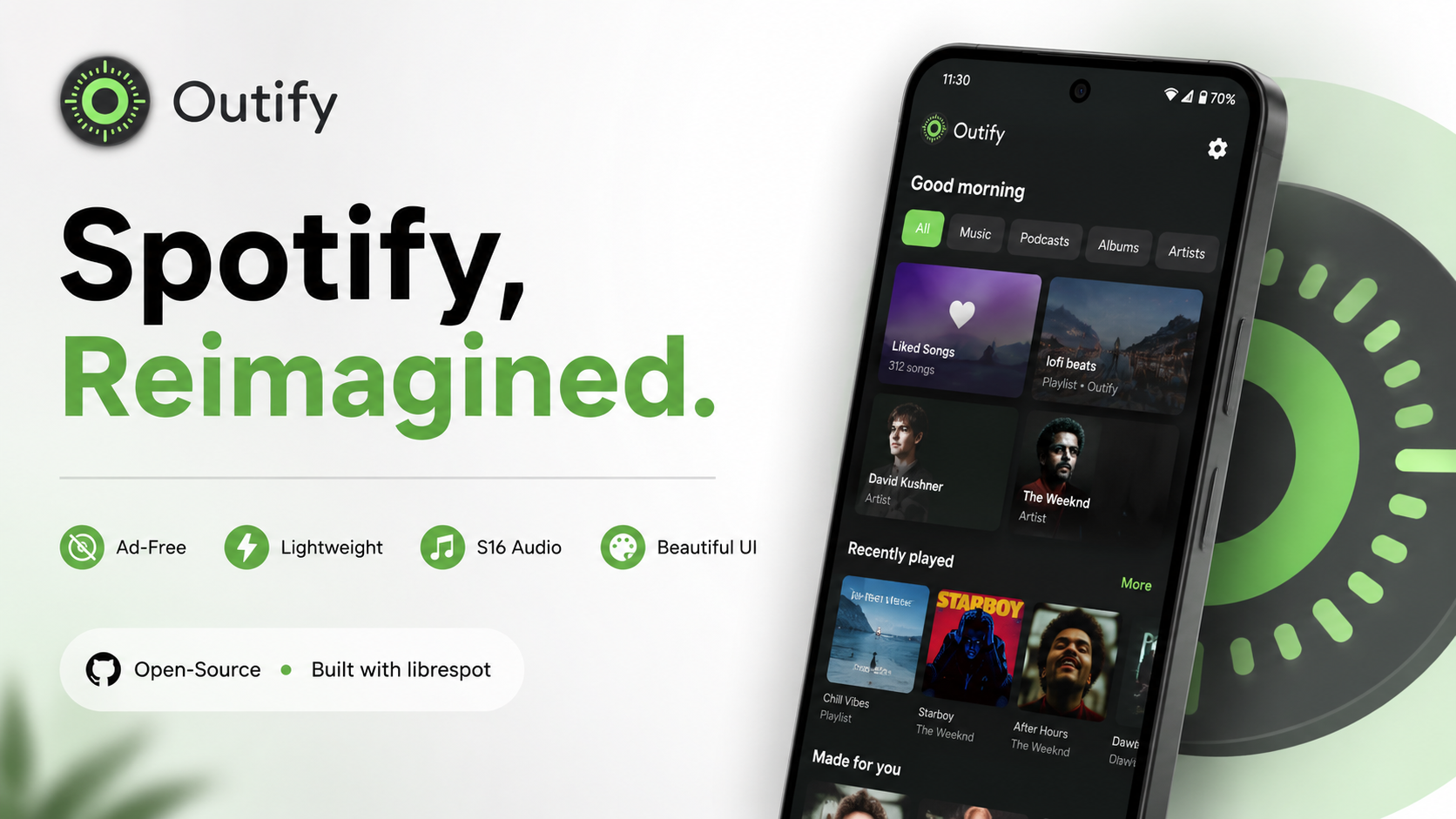
Listening to music is an integral part of our daily routines, and for millions of users worldwide, Spotify is the absolute go-to platform. While the official application is undoubtedly feature-packed, many Android enthusiasts find themselves looking for a cleaner, more lightweight, and highly customizable alternative. If you have been searching for a sleek, open-source music client that respects your device's resources and visual aesthetics without bombarding you with unnecessary clutter, you are in the right place. Today, we are going to dive deep into Outify, a beautifully designed third-party Spotify client for Android that is changing the way I listen to music.
What is Outify?
Outify is a powerful, open-source Android Spotify client that brings a fresh, minimalist perspective to music streaming. Built upon the highly robust librespot backend—which is written entirely in the Rust programming language—it acts as an alternative interface for your music library. It is specifically designed for users who appreciate the open-source philosophy and the modern Android design language.
Important Note: To adhere strictly to platform policies and ethical software usage, it is crucial to mention that Outify is a client designed for legitimate use and strictly requires an active Spotify Premium subscription to function. It does not bypass any subscription paywalls, nor does it provide free access to premium features. It is simply a safe, optimized, and gorgeous alternative user interface for dedicated music lovers who already pay for the service but want a superior visual and performance experience on their smartphones.
Watch the full tutorial here on our Youtube channel:
Key Features That Make Outify Stand Out
1. Sleek Material 3 Design & Dynamic Theming
The very first thing you will notice upon opening Outify is its gorgeous user interface. It perfectly adopts the modern Android aesthetic, known as Material 3 (or Material You). Complete with full Dynamic Material Theme support, the app beautifully extracts colors from your current system wallpaper and applies them throughout the interface. This gives the app a completely native, personalized feel that blends seamlessly with the rest of your smartphone.
2. High-Quality S16 Audio Streaming
Under the hood, the librespot backend does some heavy lifting. Outify allows you to directly and reliably stream Spotify audio right to your device. The app fully supports streaming high-quality S16 audio, ensuring that your favorite tracks sound crisp, clear, and exactly the way the artists intended them to be heard.
3. Seamless Library Syncing and Searching
Despite being a third-party client, navigating your music is effortless. You can search the entire Spotify catalog smoothly. The app allows you to view your personalized playlists, explore new albums, and check out different artists. Your entire existing Spotify library syncs up perfectly, providing a distraction-free environment to manage your music.
4. Lightweight and Bloat-Free
One of the main criticisms of modern mainstream apps is how heavy they have become, often filled with features you might never use. Outify strips all of that away. There are no heavy background processes or cluttered home pages—just you and your music.
How to Install Outify on Your Android Device
Because Outify is an open-source project in active development, you will not find it on the Google Play Store just yet. Instead, you need to download the APK file from the developer's official GitHub repository and sideload it. Here is a step-by-step guide on how to get it running:
Step 1: Download the APK
Head over to the official Outify GitHub releases page via your mobile browser and download the latest version of the APK file. The file size is incredibly small, which is a testament to its optimized nature.
Step 2: Locate the File in Your File Manager
Once the download is complete, open your preferred File Manager application on your Android device. Navigate to your "Downloads" folder, where you will see the Outify APK file waiting for you.
Step 3: Enable Installation from Unknown Sources
Tap on the APK file to begin the installation. If you have never sideloaded an app before, your device will prompt you to allow installations from unknown sources for your file manager. Simply click "Settings" on the prompt and toggle the switch to allow it.
Step 4: Install the Application
After granting permission, go back and tap the APK again. Hit the "Install" button. The system will process it in just a few seconds.
Step 5: Launch and Log In
Once installed, open Outify. You will be greeted by a login screen. Enter your Spotify Premium credentials safely through the secure API login, and your library will instantly begin to sync!
Why I Use This App Daily
I have always been a massive advocate for the Android ecosystem's flexibility, and Outify perfectly encapsulates that freedom. The primary reason I reach for Outify every single day instead of the default app is the sheer speed and visual consistency. The Material You theming makes the app feel like it was built directly by the Android operating system developers. When I change my wallpaper, my music player adapts instantly.
Furthermore, the lack of unnecessary tabs gives me exactly what I want: a pure, unadulterated music listening experience. When I open the app, I just want to hit play on my favorite album without scrolling past things I don't intend to listen to. Outify respects my time and my screen space.
Battery Impact and Performance Analysis
One of the most significant advantages of using a client powered by a Rust backend is the extreme level of optimization. During my extensive testing over the past few weeks, I closely monitored Outify's battery consumption. Compared to heavier, feature-bloated media apps, Outify merely sips battery power.
The lightweight nature of the application translates directly to minimal RAM usage and very low CPU overhead. Whether I am commuting and streaming over a 5G mobile network, or playing music in the background while heavily multitasking with navigation and messaging apps, my device stays completely cool. The battery drain is noticeably less aggressive, making it a fantastic choice for older Android devices or users who need their battery to last all day.
Potential Bugs and How I Fixed Them on My Device
As with any open-source software that is actively maintained and in its developmental stages, you might encounter a few minor hiccups. Outify is continually evolving, and during my early usage, I noticed a couple of quirks.
For instance, right after the initial installation and first login, my saved albums and liked songs took an extra minute or two to populate on the library screen, leaving a blank page momentarily. The fix was incredibly simple: I went to my recent apps menu, force-closed Outify, navigated to my Android settings to clear the app's cache, and relaunched it. Upon the next startup, the librespot backend synced flawlessly, and my entire catalog was present and ready to play.
Another scenario to keep in mind is playback initialization. If you encounter a playback error or the app seems unresponsive upon hitting the play button, double-check your account status. Because the app strictly relies on official premium endpoints to fetch the high-quality S16 audio streams, an expired Premium subscription will cause playback to fail silently. Ensuring your billing is up to date instantly resolves this.
Final Thoughts
If you are a Premium subscriber looking to breathe new life into your daily music listening routine, Outify is an absolute must-try. It combines the reliability of Rust, the beauty of Material 3, and the transparency of open-source development into one incredible package.
Stay tuned to Techynoob for more hidden gems, open-source discoveries, and deep dives into the best apps the Android community has to offer!
Subscribe to our YouTube channel for daily Android tips, tricks, and tutorials: TechyNoob
Discussion (0)
Post a Comment
No comments yet. Be the first to share your thoughts!