
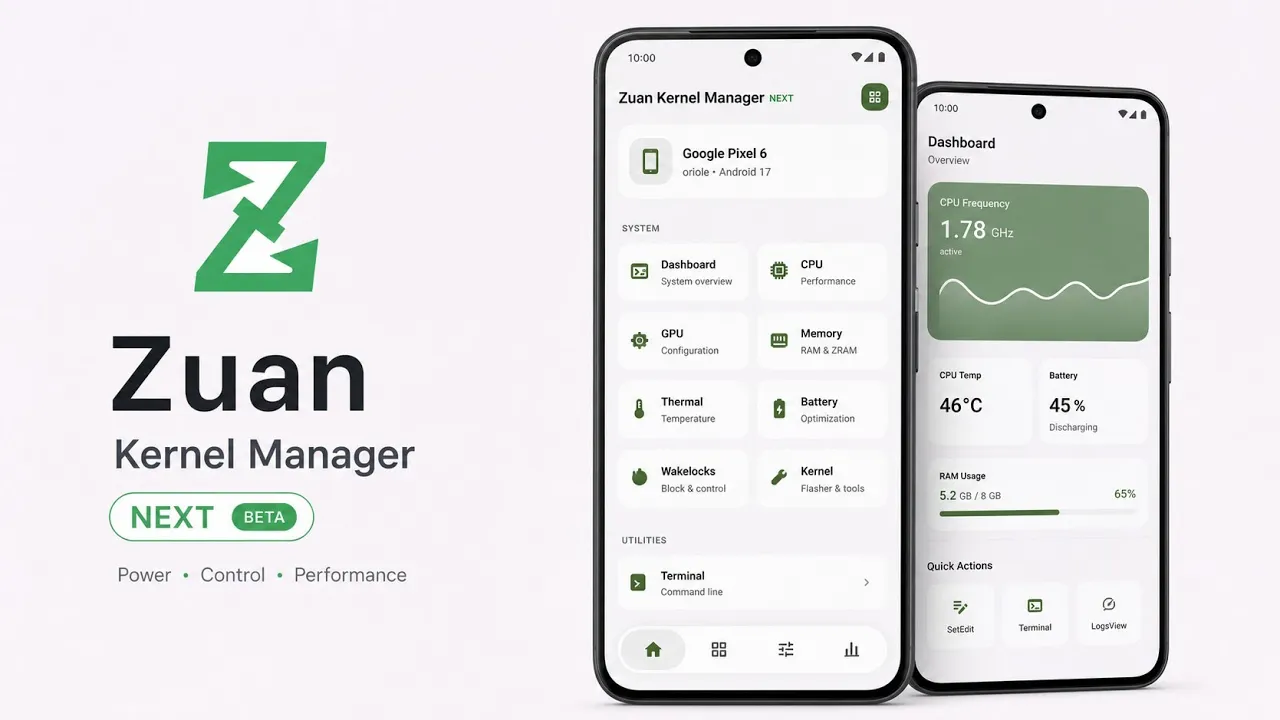
Android customization has become much more advanced over the years, especially for users who run rooted devices. Instead of relying on separate applications for performance monitoring, CPU tuning, thermal management, memory tweaks, and system utilities, some power users prefer having these controls available from a single interface.
Zuan Kernel Manager Next Beta is a new fork of the original Zuan Kernel Manager that takes that approach further. The project has been redesigned with a new interface, expanded customization options, and a collection of tools aimed at rooted Android users. Since this is a beta release, it should be treated as a testing build rather than a completely finished product.
The project is also being updated as development continues, so features and behavior can change between builds.
What Is Zuan Kernel Manager Next Beta?
Zuan Kernel Manager Next Beta is designed as an all-in-one kernel and system management application for rooted Android devices. According to the project overview, the new version is a complete fork of the original Zuan Kernel Manager with a redesigned user experience and additional functionality.
The application focuses heavily on performance and system-level controls. This makes it more suitable for users who already understand Android root environments and are comfortable changing kernel or system parameters.
Because many of its functions interact directly with the underlying system, beginners should avoid changing settings without understanding what they do. Incorrect kernel, thermal, CPU, GPU, or memory configurations can cause instability on some devices.
How to Install Zuan Kernel Manager Next Beta
Installation is relatively straightforward if your Android device is already rooted.
First, download the Zuan Kernel Manager Next Beta APK and open your device’s file manager. Navigate to the Downloads folder and locate the APK. The installation can then be started by tapping the package and selecting the install option.
Once installation is complete, launch the application.
Root Access Is Required
The first launch requires root access for the application to unlock its system-level functionality. The exact permission flow depends on the root solution installed on your phone.
With KernelSU, you can open the KernelSU manager, find Zuan Kernel Manager under the Superuser section, and grant the required permission.
For users running Magisk or APatch, the application can display a superuser request when it is launched. Granting the permission allows the manager to access the functionality that requires root.
Before granting root access to any application, make sure you obtained the APK from a source you trust.
Material 3 Expressive Interface
One of the first changes you may notice is the redesigned user interface. Zuan Kernel Manager Next Beta uses a Material 3 Expressive design with fluid transitions and glassmorphism-style blur effects through Haze integration.
The application also includes extensive theme customization intended to work across different screen densities.
For users who spend a lot of time inside root management applications, a clean interface can make a significant difference. The new design separates monitoring and configuration tools while giving the application a more modern appearance.
There is also an updated LogsView system with dynamic filtering, which can make it easier to examine system or application logs without manually searching through large amounts of information.
CPU, GPU and Performance Controls
The performance section is where Zuan Kernel Manager Next Beta becomes particularly interesting for advanced Android users.
The application provides an Enterprise Dashboard designed to display information such as SoC temperature, CPU frequencies, RAM utilization, and historical monitoring data.
For CPU and GPU configuration, the manager provides governor controls along with minimum and maximum frequency management. It also includes boost profiles for users who want to experiment with performance behavior.
These controls can be useful for testing different configurations, but higher performance settings do not automatically mean better real-world performance. Depending on the device and kernel, aggressive configurations may increase heat and battery consumption.
Memory and ZRAM Management
Memory management is another major part of the application.
Zuan Kernel Manager Next Beta provides access to Low Memory Killer parameters, virtual memory settings, and ZRAM compression configuration. These options can be useful when experimenting with how Android handles memory pressure and background applications.
However, these are not settings that should be changed randomly. Android’s memory management is closely connected to the device’s RAM capacity, kernel configuration, workload, and installed software.
If your phone already performs well, changing memory parameters simply for the sake of tweaking them may not provide a noticeable improvement.
Thermal and Battery Optimization
The application also includes deeper thermal management functionality and display refresh-rate controls.
Thermal configuration can be particularly useful for enthusiasts testing custom kernels, although it needs to be handled carefully. Thermal protection exists to prevent excessive temperatures, so disabling or weakening safeguards can have unintended consequences.
On the battery side, the manager includes options related to wakelock blocking and idle-drain prevention. These features are aimed at users who want to investigate background activity and reduce unnecessary power consumption.
Results will vary significantly depending on the device, Android version, applications, kernel, and configuration.
Additional Tools for Power Users
Beyond performance tuning, Zuan Kernel Manager Next Beta brings several system utilities into the same application.
The feature set described in the project includes a dual-engine kernel flasher with support for Horizon Logic and Capntrips Architecture, along with A/B partition support. It also includes a secure root terminal for executing commands directly on the device.
Other tools include on-device Dex2oat APK compilation, KsuWebUI server support, a build.prop editor, SetEdit database integration, application debloating, and an on-screen FPS monitor.
Having these functions together can be convenient for experienced users who normally rely on multiple separate tools.
The kernel flashing and system-editing features deserve particular caution, however. Always make sure you understand what a modification does and have a recovery or restoration method available before making significant system changes.
Beta Version: What You Should Know
The biggest thing to remember is that Zuan Kernel Manager Next Beta is a beta build.
The project description indicates that builds are released as development progresses rather than necessarily following a fixed daily release schedule. Users are encouraged to test the available builds and report problems or feedback to help improve future versions.
That means occasional bugs, incomplete features, or device-specific compatibility problems should be expected.
If you use your phone as your primary device, it may be better to experiment carefully and avoid changing critical kernel or thermal settings unless you know how to recover from a problematic configuration.
Download and Full Video Guide
You can download the Zuan Kernel Manager Next Beta APK using the link below:
Download Zuan Kernel Manager Next Beta
For the complete installation process and a visual demonstration of the interface and features, watch the accompanying video:
Credits
Project credits: ZUANVFXPROJECT3
Final Thoughts
Zuan Kernel Manager Next Beta is an interesting option for rooted Android enthusiasts who want CPU, GPU, memory, thermal, battery, kernel, and system utilities accessible from one application.
Its redesigned Material 3 Expressive interface is another noticeable change, while the broad collection of advanced tools makes it more than just a traditional kernel manager.
The important part is to remember that this is a beta project. Its features are intended for experimentation and testing, and results can differ between devices and kernels. If you decide to try it, start with settings you understand, make changes gradually, and keep a way beta project to recover your device if something goes wrong.
For users who enjoy exploring Android at the kernel and system level, Zuan Kernel Manager Next Beta is certainly a project worth keeping an eye on as development continues.

Discussion (0)
Post a Comment
No comments yet. Be the first to share your thoughts!