Looking for useful open-source Android apps that can improve your everyday smartphone experience? October 2026 brings some interesting tools worth exploring, especially if you prefer lightweight applications without advertisements or unnecessary tracking.
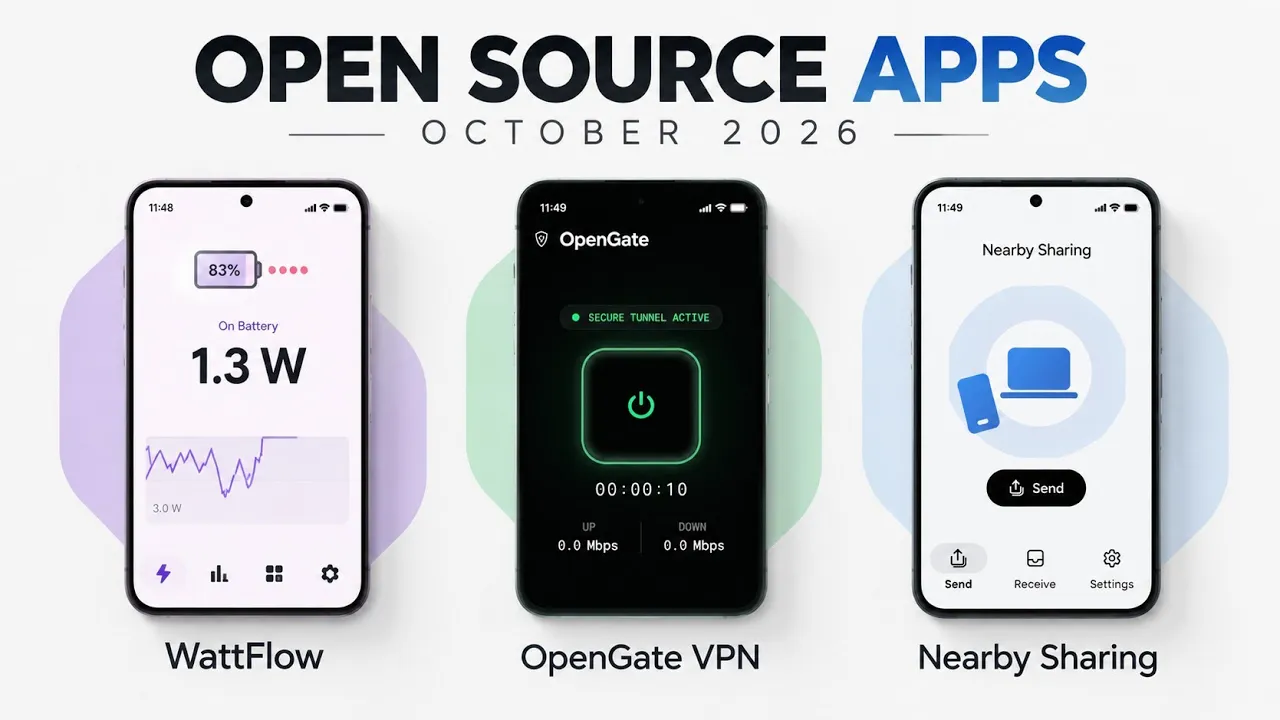
In this article, we are highlighting three open-source applications: Wattflow, Open Gate VPN, and Nearby Sharing. These apps focus on different needs, including real-time battery monitoring, VPN connectivity, and wireless file transfers between Android and Windows.
Whether you want to understand your phone's charging behavior, connect through the VPN Gate network, or transfer files to your Windows PC without cables, these applications offer different ways to make your Android experience more convenient.
1. Wattflow: Monitor Your Android Battery's Real-Time Power
If you want to understand how much power your smartphone consumes or receives while charging, Wattflow is an interesting utility to explore.
Wattflow is designed to display real-time battery power information, helping users observe charging and discharging behavior directly from their Android devices.
Key Features of Wattflow
Real-time power monitoring
Wattflow displays battery power in watts by calculating voltage multiplied by current. According to the demonstration, the readings are sampled every second, giving users a live view of power flowing into or out of the battery.
Wired and wireless charging support
The application can identify different charging setups, including AC adapters, USB connections, wireless charging pads, and docks.
Animated charging interface
Wattflow uses animated visuals to represent different battery states. These include moving dots along a cable graphic during wired charging, pulsing waves during wireless charging, and an outflow animation when the battery is discharging.
Peak power tracking
The application tracks peak input and output power during a session. This can help users observe the highest power readings recorded while charging or discharging.
Live power graph
Wattflow includes a graph showing the last 60 seconds of power history. Discharging values appear below the zero line, making it easier to distinguish power entering and leaving the battery.
Detailed battery statistics
The interface also displays battery information such as voltage, temperature, and charge level.
The demonstration describes Wattflow as an application without advertisements or analytics, making it appealing to users who prefer a cleaner battery-monitoring experience.
Who Should Use Wattflow?
Wattflow may be useful for Android users who want to observe charging behavior, compare power readings across different charging setups, or simply understand their battery's activity in greater detail.
Keep in mind that displayed power readings depend on the device's available battery sensors and reporting capabilities. They should not be treated as laboratory-grade measurements.
2. Open Gate VPN: Connect to the VPN Gate Network
Open Gate VPN is an open-source VPN client designed specifically for the VPN Gate network.
VPN services can sometimes involve subscriptions, account requirements, or advertisements. Open Gate VPN offers another approach by providing access to a network of volunteer-operated VPN servers.
Key Features of Open Gate VPN
Access to volunteer-operated VPN servers
The application connects users to servers available through the VPN Gate network. Users can browse the available server list and select a connection based on their needs.
Simple connection interface
Open Gate VPN is designed to make connecting to a VPN straightforward. The demonstration shows a simple interface where users can establish a connection with a single tap.
Server selection and connection information
Users can browse available servers and check connection speeds before choosing a server. Actual performance depends on server availability, network conditions, and distance.
Open-source client
The project provides an open-source client, allowing interested users to inspect its code. However, an open-source client does not automatically guarantee that every server is trustworthy or that no data is collected elsewhere in the connection process.
Free access without premium tiers
The demonstration describes Open Gate VPN as a free client without forced registration, bandwidth caps, or premium tiers. Availability and performance depend on the underlying VPN Gate network.
Why Use Open Gate VPN?
Open Gate VPN may be useful for users who want to explore the VPN Gate network, connect through volunteer-operated servers, or use a VPN connection on public Wi-Fi.
A VPN can encrypt traffic between your device and the VPN server, but it does not make all online activity anonymous. The VPN provider or server operator may still have visibility into some connection information.
Server selection, trust, and privacy policies matter, so users should understand the risks before connecting.
Who Should Use Open Gate VPN?
This application may interest users who want a lightweight VPN Gate client and are comfortable choosing from a network of volunteer-operated servers.
It is worth remembering that connection reliability, speed, and privacy depend on the server and the network configuration.
3. Nearby Sharing: Transfer Files Between Android and Windows
Nearby Sharing is designed to simplify file transfers between Android devices and Windows computers using the built-in Windows Nearby Sharing feature.
If you regularly move photos, documents, links, or text between your phone and PC, this application aims to make the process more convenient without relying on cloud storage or emailing files to yourself.
Key Features of Nearby Sharing
Android-to-Windows file transfers
Nearby Sharing is designed to work with the native Nearby Sharing feature available on Windows 10 and Windows 11, allowing users to transfer supported content between compatible devices.
Send and receive files
The application supports sending and receiving files, links, and plain text through the sharing workflow described in the demonstration.
Android share-sheet integration
One of its key conveniences is integration with the Android share menu.
Instead of opening a separate file-transfer application and manually selecting a destination, users can select a file, tap Share, and choose their Windows computer when it appears as an available destination.
Local network transfers
The demonstration describes transfers using the local network, which can help move large files without uploading them to cloud storage first.
Actual transfer speeds depend on the devices, network conditions, and file size.
Open-source project
Nearby Sharing is presented as an open-source tool intended to simplify cross-platform file sharing. Its implementation and security properties should be verified through the official project documentation.
Why Use Nearby Sharing?
Nearby Sharing can be useful for people who regularly work across Android and Windows.
For example, you can use it to move photos from your phone to your computer, share documents between devices, or transfer links and text without relying on a USB cable.
It provides an alternative to manually uploading files to cloud services or sending them to yourself through messaging or email.
Who Should Use Nearby Sharing?
This application may be useful for students, content creators, professionals, and anyone who frequently transfers files between an Android phone and a Windows PC.
Compatibility depends on the application version, Android device, Windows configuration, and supported sharing features.
How to Download and Install These Open-Source Apps on Android
The exact installation process may vary depending on how each developer distributes the application. If an APK is provided, you can generally follow these steps:
Step 1: Visit the Official Project Page
Open the official GitHub repository or developer website for the application you want to install.
Review the latest release and confirm that the package is intended for Android and is compatible with your device.
Step 2: Download the APK
Download the APK file from the official release page and save it to your device's Downloads folder.
Avoid downloading installation files from unfamiliar third-party websites.
Step 3: Install the Application
Open your file manager and tap the downloaded APK.
If Android requests permission to install applications from that source, review the prompt and allow it only if you trust the source.
Tap Install and wait for the process to finish.
Step 4: Open and Configure the App
Launch the application and review its available settings.
- Wattflow: Check the available battery information and charging statistics.
- Open Gate VPN: Review the server list and connection details before connecting.
- Nearby Sharing: Follow the application's setup instructions and verify compatibility with your Windows PC.
Step 5: Check for Updates
Visit the official project page periodically to review new releases, compatibility changes, and security updates.
Always verify the source before installing an update.
Which App Should You Try First?
Each application serves a different purpose:
| AppMain Purpose | |
| Wattflow | Real-time battery power monitoring |
| Open Gate VPN | Connecting to the VPN Gate network |
| Nearby Sharing | File transfers between Android and Windows |
Choose the application based on what you need: battery insights, VPN connectivity, or cross-platform file sharing.
Final Thoughts
These three open-source applications focus on different aspects of everyday Android use.
Wattflow provides real-time battery power information and charging visuals. Open Gate VPN offers access to the VPN Gate network through a dedicated client. Nearby Sharing aims to simplify file transfers between Android and Windows.
If you enjoy discovering open-source tools, these applications are worth exploring based on your needs and device compatibility. Always review the official project documentation, verify downloads, and understand the privacy and security implications before using any application.
Watch the Full Video
Watch the complete video featuring all three open-source applications for October 2026:
Download
Download the applications from their official project sources:
Credits / Official Developer
Visit the official project pages for source code, release information, and updates:
- Wattflow Official Developer / GitHub
- Open Gate VPN Official Developer / GitHub
- Nearby Sharing Official Developer / GitHub

Discussion (0)
Post a Comment
No comments yet. Be the first to share your thoughts!